Configuring VLT on OS10
View on GitHubConfiguring VLT on OS10
My Test Platform
Section titled “My Test Platform”OS10# show versionDell EMC Networking OS10 EnterpriseCopyright (c) 1999-2020 by Dell Inc. All Rights Reserved.OS Version: 10.5.1.3Build Version: 10.5.1.3.190Build Time: 2020-06-19T21:48:07+0000System Type: S4112F-ONArchitecture: x86_64Up Time: 00:19:57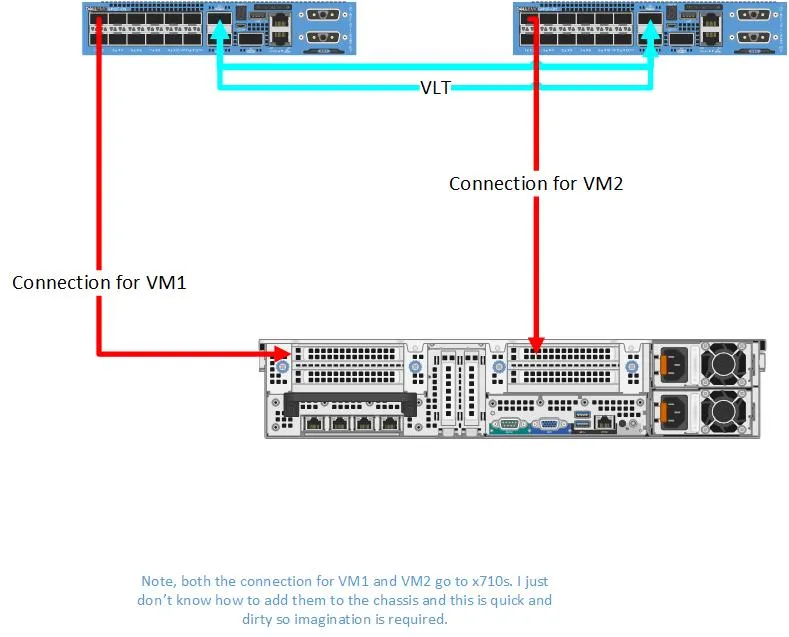
Configuration of VLT
Section titled “Configuration of VLT”Device 1
Section titled “Device 1”# Configure managementconfigure terminalinterface mgmt 1/1/1no ip address dhcpip address 192.168.1.24/24exit# Configure spanning treespanning-tree mode rstpinterface range ethernet 1/1/13-1/1/14# Create a VLT Domain and Configure the VLT interconnect (VLTi)no switchportexitvlt-domain 1discovery-interface ethernet 1/1/13discovery-interface ethernet 1/1/14# Configure the VLT Priority, VLT MAC Address, and VLT Backup Linkprimary-priority 4096vlt-mac 00:11:22:33:44:55backup destination 192.168.1.25endDevice 2
Section titled “Device 2”# Configure managementconfigure terminalinterface mgmt 1/1/1no ip address dhcpip address 192.168.1.25/24exit# Configure spanning treespanning-tree mode rstpinterface range ethernet 1/1/13-1/1/14# Create a VLT Domain and Configure the VLT interconnect (VLTi)no switchportexitvlt-domain 1discovery-interface ethernet 1/1/13discovery-interface ethernet 1/1/14# Configure the VLT Priority, VLT MAC Address, and VLT Backup Linkprimary-priority 8192vlt-mac 00:11:22:33:44:55backup destination 192.168.1.24endConfiguration of VLANs for Test
Section titled “Configuration of VLANs for Test”(On both devices)
configure terminalinterface vlan 9no shutexitinterface ethernet 1/1/1switchport mode trunkswitchport trunk allowed vlan 9endOn ESXi I used two separate virtual switches each with a port group. Each port group was assigned VLAN 9.
Test Scenario
Section titled “Test Scenario”Objective
Section titled “Objective”Ping from VM1 to VM2 to show that communication will flow over the VLT and vice versa.
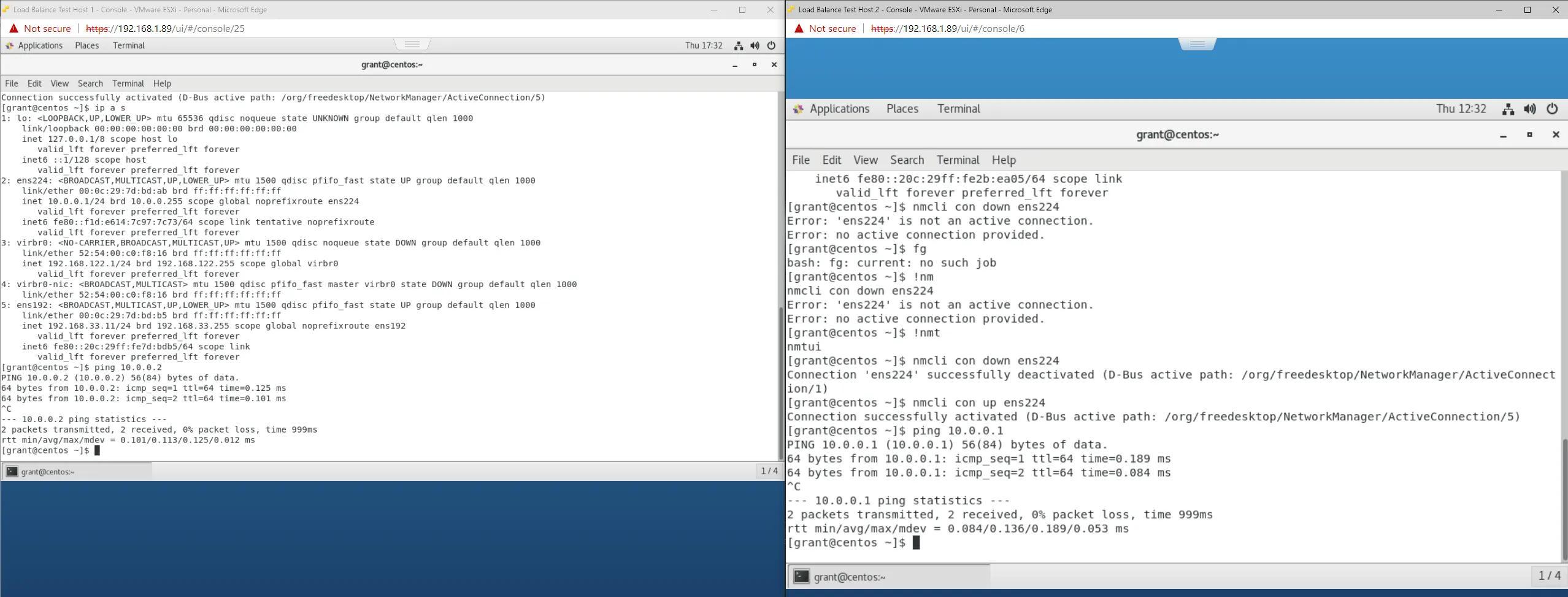
Works as expected.
Useful Commands
Section titled “Useful Commands”show vlt 1show vlt 1 mismatchshow running-configuration vlt
Spanning Tree and VLT
Section titled “Spanning Tree and VLT”I created the below scenario to see what would happen if you created a situation where RSTP can forward from S2 across both port 11 and port 12 to get to interface VLAN 1 on switch 3. In this scenario I gave the VLAN 1 SVI on S2 10.0.0.2 and on S# 10.0.0.3.
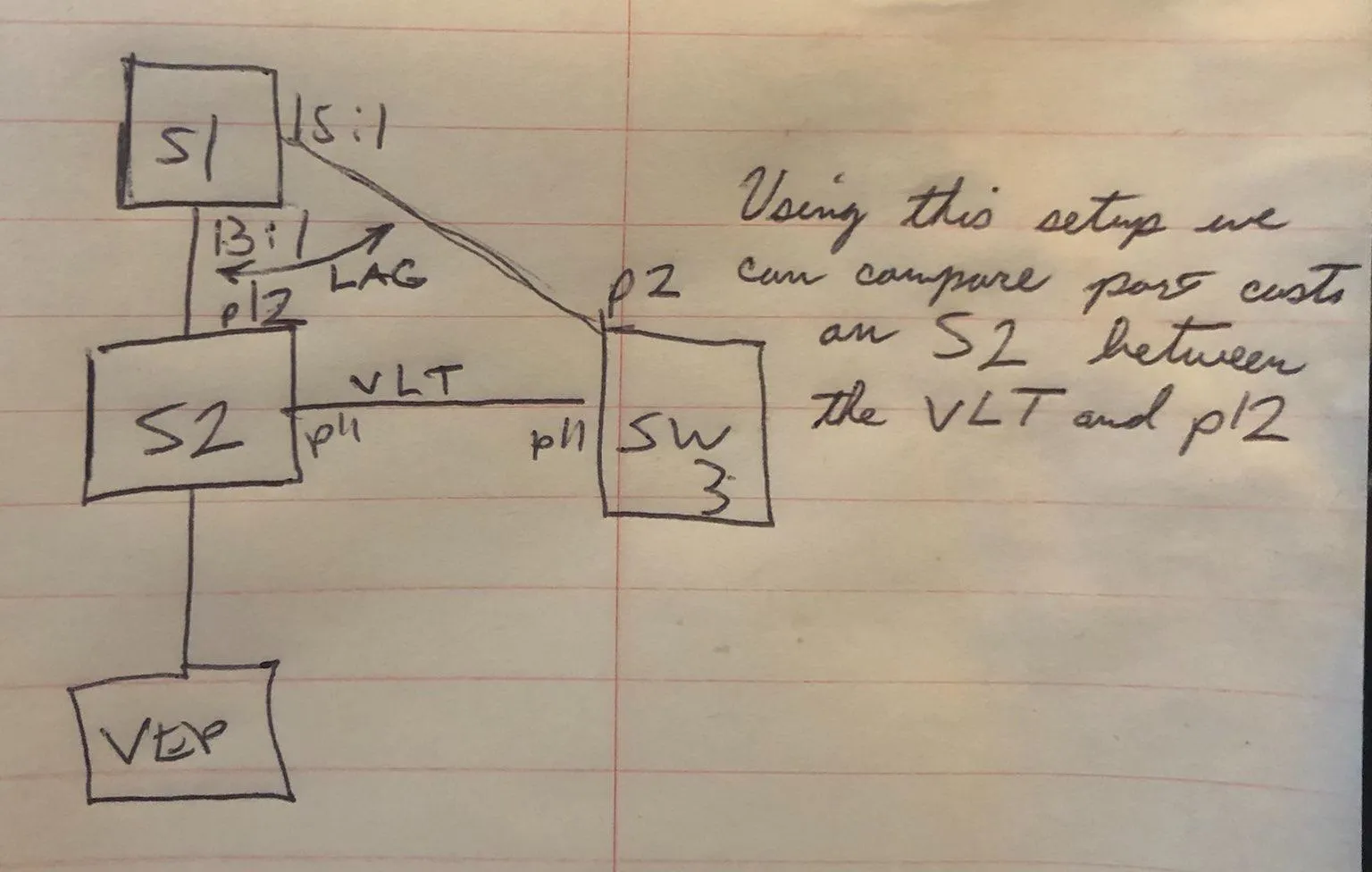
The first thing I investigated were the effects on STP on S2.
Under the hood you can drop to the Linux command line and inspect the bridge associated with the VLT setup to see its root path cost (here my VLT interface is bo1000). It is worth noting that VLT interfaces are represented as bonds to the Linux kernel. Furthermore I also noticed the updated values, if updated from the OS10 shell, are not reflected here:
root@OS10:~# brctl showstp br1br1bridge id              8000.886fd498b7b1designated root        8000.886fd498b7b1root port                 0                    path cost                  0max age                  20.00                 bridge max age            20.00hello time                2.00                 bridge hello time          2.00forward delay            15.00                 bridge forward delay      15.00ageing time            5400.00hello timer               0.00                 tcn timer                  0.00topology change timer     0.00                 gc timer                 910.24flags

bo1000 (16)port id                8010                    state                forwardingdesignated root        8000.886fd498b7b1       path cost                100designated bridge      8000.886fd498b7b1       message age timer          0.00designated port        8010                    forward delay timer        0.00designated cost           0                    hold timer                 0.00flags
...
e101-012-0 (13)port id                800d                    state                forwardingdesignated root        8000.886fd498b7b1       path cost                100designated bridge      8000.886fd498b7b1       message age timer          0.00designated port        800d                    forward delay timer        0.00designated cost           0                    hold timer                 0.00flags
You can see which interfaces are in the VLT bond with ip a s | grep <the interface use used for vlt>. In my case I only used interface 11 so I did:
root@OS10:~# ip a s | grep e101-011-023: e101-011-0: <BROADCAST,MULTICAST,ALLMULTI,SLAVE,UP,LOWER_UP> mtu 9184 qdisc multiq master bo1000 state UP group default qlen 1000so we can see here that the VLT bond is bo1000. I then performed a ping 10.0.0.3 from S2 and checked the MAC address table.
OS10(conf-if-vl-1)# do show mac address-tableVlanId Mac Address Type Interface...1 88:6f:d4:98:a7:b1 static port-channel1000We can see that the switch learned the MAC address for switch 3 over the VLT interface.
I had a sneaky suspicion that the switch was biasing the VLT link so I reset the experiment except instead of having the VLT between S2 and S3 I put the VLT between S1 and S2. This has the effect of making it so that instead of a single hop across a port channel to get to S3 it would have two hops using the VLT:
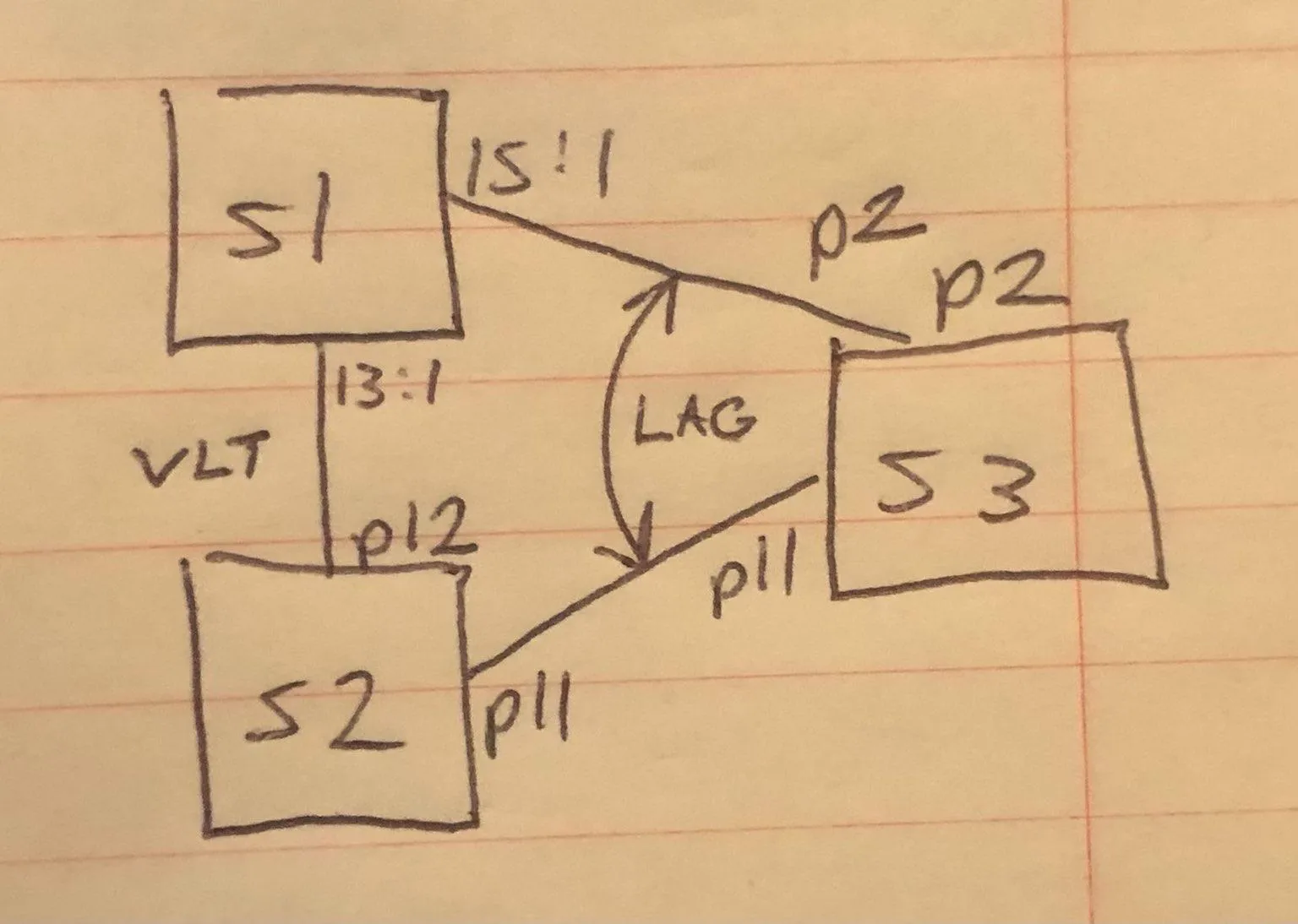
I then repeated my VLAN 1 ping test from S2 to S3 and as expected - S2 learned S3’s mac address of 88:6f:d4:98:a7:b1 on the VLT port not the port channel:
On S2:
OS10# show mac address-tableVlanId Mac Address Type Interface...1 88:6f:d4:98:a7:b1 dynamic port-channel1000What’s going on here is that under the covers it looks like, all things being equal, spanning tree will favor the VLT link. However, if you go into the interface and set the port priority and cost with spanning-tree rstp cost 1 and spanning-tree rstp priority 0, you can force it to use the port channel instead. I repeated my ping test and then checked the mac address table on S2 and as expected got:
OS10(config)# show mac address-tableVlanId Mac Address Type Interface...1 88:6f:d4:98:a7:b1 dynamic ethernet1/1/11Then to confirm my results, on S2, I went back and deprioritized port 11 with:
OS10(config)# interface ethernet 1/1/11OS10(conf-if-eth1/1/11)# spanning-tree rstp cost 200000000OS10(conf-if-eth1/1/11)# spanning-tree rstp priority 240and then redid my ping and as expected got:
OS10(config)# ping 10.0.0.3PING 10.0.0.3 (10.0.0.3) 56(84) bytes of data.64 bytes from 10.0.0.3: icmp_seq=1 ttl=64 time=1.16 ms64 bytes from 10.0.0.3: icmp_seq=2 ttl=64 time=1.04 ms^C--- 10.0.0.3 ping statistics ---2 packets transmitted, 2 received, 0% packet loss, time 1001msrtt min/avg/max/mdev = 1.047/1.106/1.166/0.068 msOS10(config)# show mac address-tableVlanId Mac Address Type Interface...1 88:6f:d4:98:a7:b1 dynamic port-channel1000