Using the iDRAC Service Module
View on GitHubUsing the iDRAC Service Module
Objective
Section titled “Objective”Establish direct, inter-chassis, communication between a host operating system and the iDRAC.
My Setup
Section titled “My Setup”Hardware
Section titled “Hardware”Dell R840 Note: This will work with any Dell server with iDRAC support.
Operating System
Section titled “Operating System”NAME="Red Hat Enterprise Linux"VERSION="8.4 (Ootpa)"ID="rhel"ID_LIKE="fedora"VERSION_ID="8.4"PLATFORM_ID="platform:el8"PRETTY_NAME="Red Hat Enterprise Linux 8.4 (Ootpa)"ANSI_COLOR="0;31"CPE_NAME="cpe:/o:redhat:enterprise_linux:8.4:GA"HOME_URL="https://www.redhat.com/"DOCUMENTATION_URL="https://access.redhat.com/documentation/red_hat_enterprise_linux/8/"BUG_REPORT_URL="https://bugzilla.redhat.com/"
REDHAT_BUGZILLA_PRODUCT="Red Hat Enterprise Linux 8"REDHAT_BUGZILLA_PRODUCT_VERSION=8.4REDHAT_SUPPORT_PRODUCT="Red Hat Enterprise Linux"REDHAT_SUPPORT_PRODUCT_VERSION="8.4"Red Hat Enterprise Linux release 8.4 (Ootpa)Red Hat Enterprise Linux release 8.4 (Ootpa)Installation
Section titled “Installation”- Go to your server’s support page. In my case this is for the R840 and select the appropriate operating system.
- Click “Show All” on the driver list to see all the different drivers
- Look for the entry which says “iDRAC Service Module” and download it. The Linux entry is here
- Move the file to your server, extract, and run
setup.sh
Establishing Direct Communication
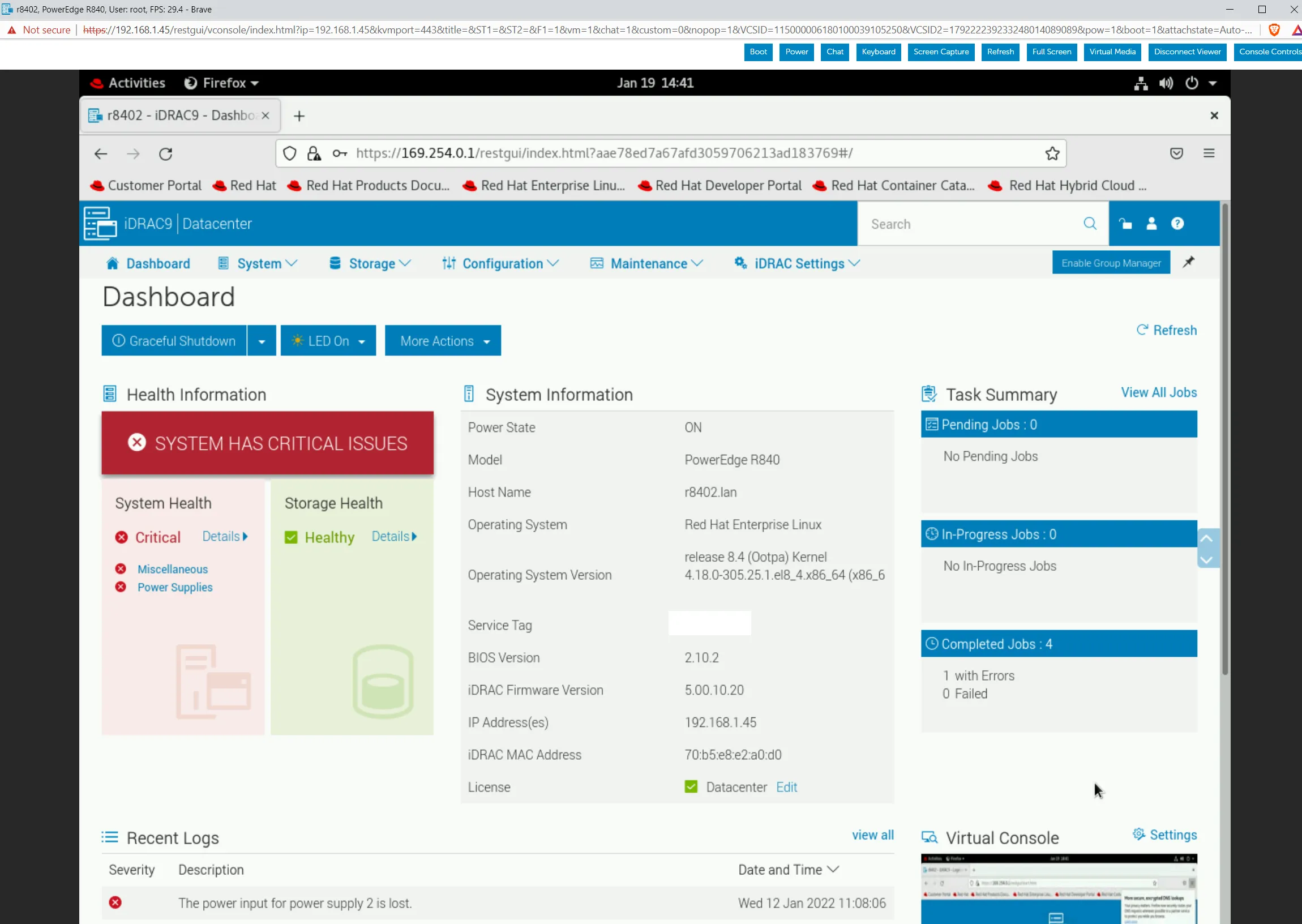
Section titled “Establishing Direct Communication”The way the iDRAC service module works is that it adds a driver which then adds a virtual NIC called iDRAC:
[root@r8402 OM-SrvAdmin-Dell-Web-LX-10.1.0.0-4561.RHEL8.x86_64_A00]# ip a s1: lo: <LOOPBACK,UP,LOWER_UP> mtu 65536 qdisc noqueue state UNKNOWN group default qlen 1000 link/loopback 00:00:00:00:00:00 brd 00:00:00:00:00:00 inet 127.0.0.1/8 scope host lo valid_lft forever preferred_lft forever inet6 ::1/128 scope host valid_lft forever preferred_lft forever2: eno145: <NO-CARRIER,BROADCAST,MULTICAST,UP> mtu 1500 qdisc mq state DOWN group default qlen 1000 link/ether e4:43:4b:9f:44:00 brd ff:ff:ff:ff:ff:ff3: eno99: <BROADCAST,MULTICAST,UP,LOWER_UP> mtu 1500 qdisc mq state UP group default qlen 1000 link/ether e4:43:4b:9f:44:20 brd ff:ff:ff:ff:ff:ff inet 192.168.1.89/24 brd 192.168.1.255 scope global noprefixroute eno99 valid_lft forever preferred_lft forever inet6 fe80::e643:4bff:fe9f:4420/64 scope link noprefixroute valid_lft forever preferred_lft forever4: eno146: <NO-CARRIER,BROADCAST,MULTICAST,UP> mtu 1500 qdisc mq state DOWN group default qlen 1000 link/ether e4:43:4b:9f:44:02 brd ff:ff:ff:ff:ff:ff5: eno100: <NO-CARRIER,BROADCAST,MULTICAST,UP> mtu 1500 qdisc mq state DOWN group default qlen 1000 link/ether e4:43:4b:9f:44:21 brd ff:ff:ff:ff:ff:ff6: idrac: <BROADCAST,MULTICAST,UP,LOWER_UP> mtu 1500 qdisc fq_codel state UNKNOWN group default qlen 1000 link/ether 70:b5:e8:e2:a0:d3 brd ff:ff:ff:ff:ff:ff inet 169.254.0.2/16 brd 169.254.255.255 scope global idrac valid_lft forever preferred_lft forever7: virbr0: <NO-CARRIER,BROADCAST,MULTICAST,UP> mtu 1500 qdisc noqueue state DOWN group default qlen 1000 link/ether 52:54:00:b5:c5:1b brd ff:ff:ff:ff:ff:ff inet 192.168.122.1/24 brd 192.168.122.255 scope global virbr0 valid_lft forever preferred_lft forever8: virbr0-nic: <BROADCAST,MULTICAST> mtu 1500 qdisc fq_codel master virbr0 state DOWN group default qlen 1000 link/ether 52:54:00:b5:c5:1b brd ff:ff:ff:ff:ff:ffThe inter-chassis network uses the IPv4 link local subnet 169.254.0.0/16. In general, the server should be 169.254.0.2 and the iDRAC itself is 169.254.0.1. You can connect to 169.254.0.1 as you would any iDRAC address: