Load Balancing with LAG OPX
View on GitHubLoad Balance Testing on 4112F-ON/OpenSwitch (OPX)
In this test case the goal is to create a simple packet broker using a reverse LAG port.
Helpful Links
Section titled “Helpful Links”ONIE Network Install Process Overview
OPX Install Instructions for Dell EMC Equipment
Helpful Debug Commands
Section titled “Helpful Debug Commands”cps_get_oid.py -qua target base-switch/switching-entities/switching-entitycps_model_info base-switch/switching-entities/switching-entitycps_set_oid.py -qua target base-switch/switching-entities/switching-entity name=lag-hash-fields attr=src-ip,dest-ip,l4-dest-port,l4-src-port,ip-protocolMy Configuration
Section titled “My Configuration”General Configuration
Section titled “General Configuration”- ONIE host is running RHEL 8
- I am using a Dell S4112F-ON for testing
- OpenSwitch version PKGS_OPX-3.2.0-installer-x86_64
- PFSense running DNS and DHCP as services
RHEL Release Info
Section titled “RHEL Release Info”NAME="Red Hat Enterprise Linux"VERSION="8.0 (Ootpa)"ID="rhel"ID_LIKE="fedora"VERSION_ID="8.0"PLATFORM_ID="platform:el8"PRETTY_NAME="Red Hat Enterprise Linux 8.0 (Ootpa)"ANSI_COLOR="0;31"CPE_NAME="cpe:/o:redhat:enterprise_linux:8.0:GA"HOME_URL="https://www.redhat.com/"BUG_REPORT_URL="https://bugzilla.redhat.com/"
REDHAT_BUGZILLA_PRODUCT="Red Hat Enterprise Linux 8"REDHAT_BUGZILLA_PRODUCT_VERSION=8.0REDHAT_SUPPORT_PRODUCT="Red Hat Enterprise Linux"REDHAT_SUPPORT_PRODUCT_VERSION="8.0"Red Hat Enterprise Linux release 8.0 (Ootpa)Red Hat Enterprise Linux release 8.0 (Ootpa)OPX Version
Section titled “OPX Version”OS_NAME="OPX"OS_VERSION="unstable"PLATFORM="S4112F-ON"ARCHITECTURE="x86_64"INTERNAL_BUILD_ID="OpenSwitch blueprint for Dell 1.0.0"BUILD_VERSION="unstable.0-stretch"BUILD_DATE="2019-06-21T19:04:22+0000"INSTALL_DATE="2019-10-23T23:16:10+00:00"SYSTEM_UPTIME= 1 day, 5 minutesSYSTEM_STATE= runningUPGRADED_PACKAGES=noALTERED_PACKAGES=yesWasn’t sure why I got the unstable version after installation. It didn’t cause any problems for testing so I just left it as is.
Setup ONIE Prerequisites
Section titled “Setup ONIE Prerequisites”See ONIE Install Setup for instructions.
Configure Device for Reverse LAG
Section titled “Configure Device for Reverse LAG”Physical Configuration
Section titled “Physical Configuration”I used the following SFPs
- 1, 1Gb/s copper SFP (e101-001-0) for input
- 2, 1Gb/s copper SFPs (e101-005-0/e101-009-0) and 1, 10Gb/s, fiber SFP (e101-012-0) for output
Input Port
Section titled “Input Port”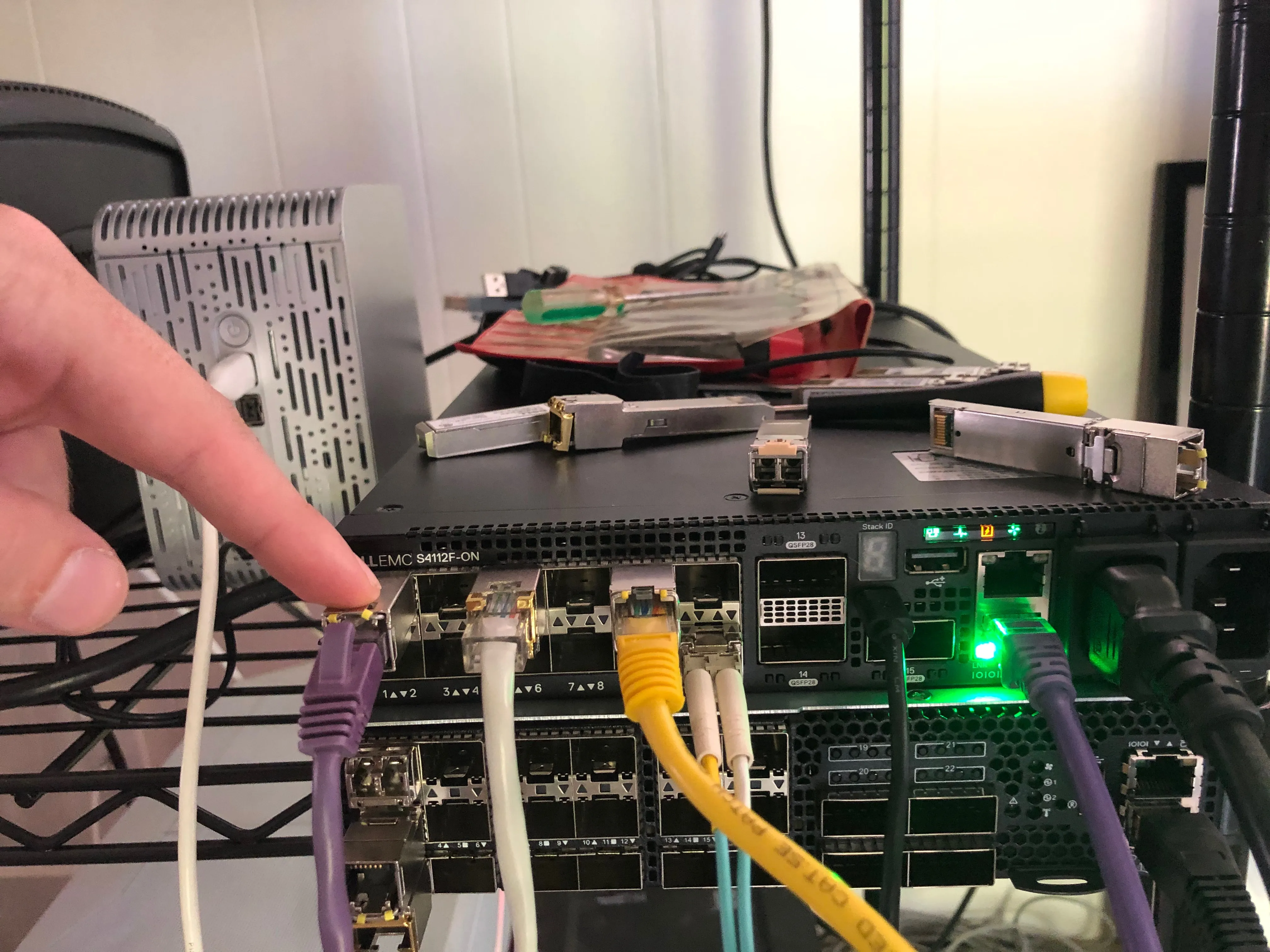
Output Ports
Section titled “Output Ports”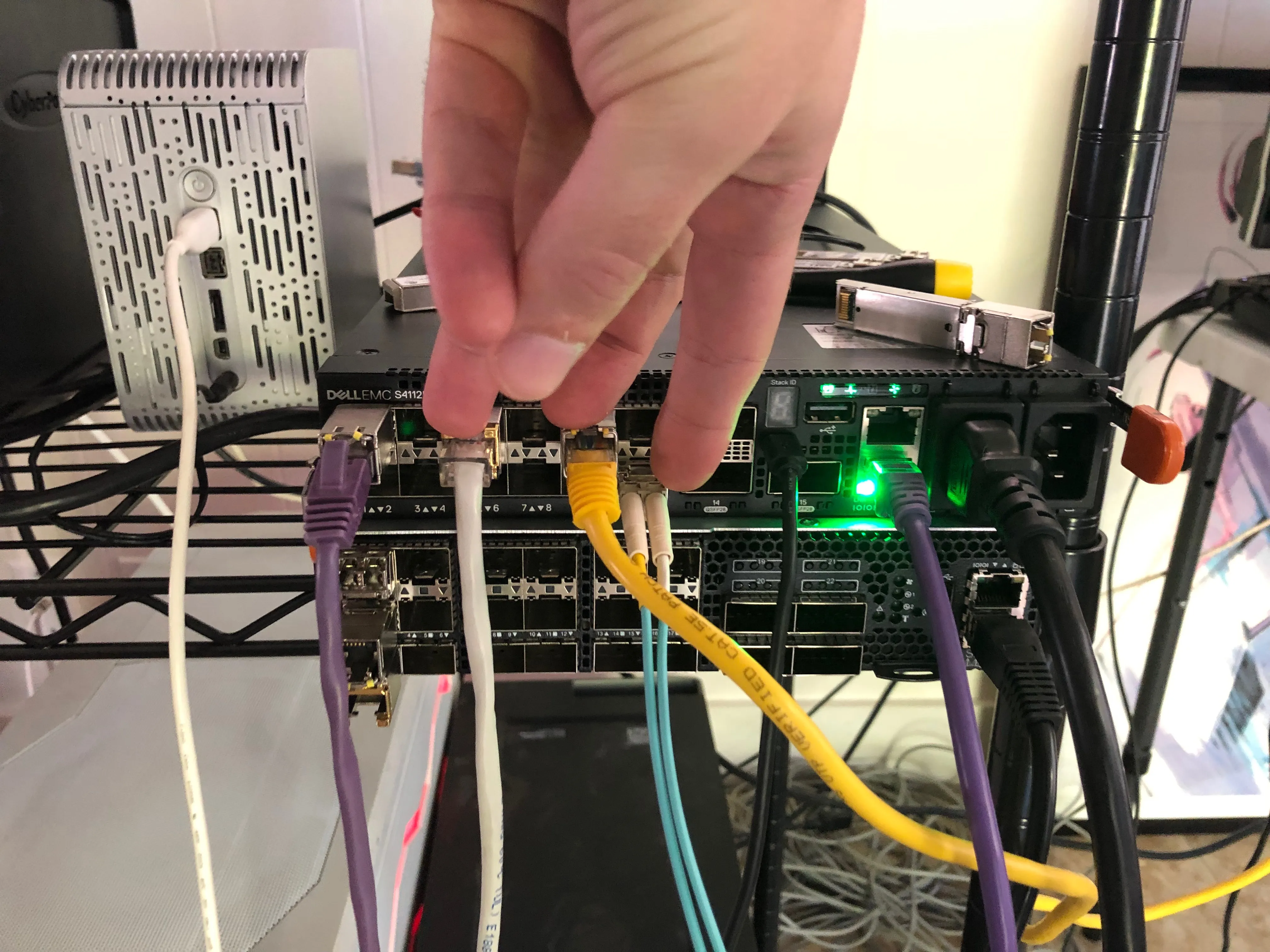
LAG Configuration
Section titled “LAG Configuration”Enable LAG Ports and Input Port
Section titled “Enable LAG Ports and Input Port”root@OPX:~# ip link set e101-001-0 uproot@OPX:~# ip link set e101-005-0 uproot@OPX:~# ip link set e101-009-0 uproot@OPX:~# ip link set e101-012-0 uproot@OPX:~# opx-show-interface --summaryPort | Enabled | Operational status | Supported speed-----------------------------------------------------------e101-001-0 | yes | up | 1G 10Ge101-002-0 | no | down | 1G 10Ge101-003-0 | no | down | 1G 10Ge101-004-0 | no | down | 1G 10Ge101-005-0 | yes | up | 1G 10Ge101-006-0 | no | down | 1G 10Ge101-007-0 | no | down | 1G 10Ge101-008-0 | no | down | 1G 10Ge101-009-0 | yes | up | 1G 10Ge101-010-0 | no | down | 1G 10Ge101-011-0 | no | down | 1G 10Ge101-012-0 | yes | up | 1G 10Ge101-013-0 | no | down | 100Ge101-014-0 | no | down | 100Ge101-015-0 | no | down | 100Geth0 | yes | UNKNOWN | UNKNOWNConfigure LAG
Section titled “Configure LAG”Configure LAG Algorithm
Section titled “Configure LAG Algorithm”You can see the switch’s global paramters with the opx-show-global-switch command:
root@OPX:~# opx-show-global-switchSwitch id 0 ACL entry max priority: 2147483647 ACL entry min priority: 0 ACL table max priority: 11 ACL table min priority: 0 Bridge table size: 147456 BST enable: off BST tracking mode: current Counter refresh interval: 5 s Default mac address: 88:6f:d4:98:b7:80 ECMP group size: 256 ECMP hash algorithm: crc ECMP hash seed value: 0 Egress buffer pool num: 4 Ingress buffer pool num: 4 IPv6 extended prefix routes: 0 IPv6 extended prefix routes lpm block size: 1024 L3 nexthop table size: 32768 LAG hash algorithm: crc LAG hash seed value: 0 MAC address aging timer: 1800 s Max ECMP entries per group: 0 Max IPv6 extended prefix routes: 3072 Max MTU: 9216 Max VXLAN overlay nexthops: 4096 Max VXLAN overlay rifs: 2048 Number of multicast queues per port: 10 Number of queues cpu port: 43 Number of queues per port: 20 Number of unicast queues per port: 10 QoS rate adjust: 0 RIF table size: 12288 Switch mode: store and forward Temperature: 49 deg. C Total buffer size: 12188 UFT mode: default UFT host table size: 135168 UFT L2 mac table size: 147456 UFT L3 route table size: 16384 VXLAN riot enable: onIf you want to change the hash algorithm you can do so with opx-config-global-switch --lag-hash-alg <crc | random | xor>
I went ahead and left mine are CRC. This article from Dell can be helpful in deciding.
Configure LAG Fields
Section titled “Configure LAG Fields”More imporantly you will probably want to configure what fields are used to determine the hash. The options are:
- src-mac: The source MAC address of the frame
- dest-mac: The destination MAC of the frame
- vlan-id: The VLAN ID listed in the frame
- ethertype: The ethertype of the frame
- ip-protocol: The IP protocol field in the IPv4 header
- src-ip: The packet source IP
- dest-ip: The destination IP of the packet
- l4-dest-port: The destination port of the segment
- l4-src-port: The source port of the segment
- in-port: The port from which the packet entered. It is unlikely you would want to use this for a reverse LAG
I will use a standard 5-tuple configuration (src/dst IP, src/dest port, protocol #)
Create LAG
Section titled “Create LAG”opx-config-lag create --name reverse_lag --unblockedports e101-005-0,e101-009-0,e101-012-0 --enable
Results
Section titled “Results”I wasn’t able to complete the config. There is a bug in OPX preventing you from being able to set the fields on which the LAG will hash. I spent about a day working my way through the problem. See current status on this bug ticket