DHCP Relay on SONiC
View on GitHubDHCP Relay on SONiC
- Configuring a Cross VLAN DHCP Relay on SONiC OS
My Configuration
Section titled “My Configuration”Dell 4112F-ON running OS 10 (interface eth1/1/13 to interface ethernet 0 [all VLAN 99]) |Dell Z9264 running SONiC OS (interface ethernet 257 to interface vmnic7 [all vlan 100]) |Dell R840 running ESXi (virtual switch with portgroup on vlan 100 going to VM's virtual NIC) |RHEL Virtual Machine with DHCP serverIP Addresses
Section titled “IP Addresses”- RHEL VM: 192.168.100.5/24
- Z9264 SVI interface on VLAN 99: 192.168.99.1/24
- Z9264 SVI interface on VLAN 100: 192.168.100.1/24
- 4112F-ON SVI interface on VLAN 99 - DHCP
Test Concept
Section titled “Test Concept”DHCP request will go from SVI interface on 4112F-ON residing on VLAN 99 through the Z9264, to ESXi, and onto the DHCP server running on the RHEL virtual machine on VLAN 100 running dhcpd.
4112F-ON OS 10 Version
Section titled “4112F-ON OS 10 Version”Dell EMC Networking OS10 EnterpriseCopyright (c) 1999-2020 by Dell Inc. All Rights Reserved.OS Version: 10.5.1.3Build Version: 10.5.1.3.190Build Time: 2020-06-19T21:48:07+0000System Type: S4112F-ONArchitecture: x86_64Up Time: 1 day 01:29:03Z9264 SONiC Version
Section titled “Z9264 SONiC Version”Software Version : '3.4.0-Enterprise_Base'Product : Enterprise SONiC Distribution by Dell TechnologiesDistribution : '9.13'Kernel : '4.9.0-11-2-amd64'Config DB Version : version_3_3_1Build Commit : 'e2f258af7'Build Date : Wed Jul 28 23:54:33 UTC 2021Built By : sonicbld@sonic-lvn-csg-005Platform : x86_64-dellemc_z9264f_c3538-r0HwSKU : DellEMC-Z9264f-C64ASIC : broadcomHardware Version : A00Serial Number : TW0XXP63DNT008970001Uptime : 04:53:36 up 2:05, 1 user, load average: 1.04, 0.94, 0.95Mfg : Dell EMCRHEL Version
Section titled “RHEL Version”[root@freeipa ~]# cat /etc/*-releaseNAME="Red Hat Enterprise Linux"VERSION="8.2 (Ootpa)"ID="rhel"ID_LIKE="fedora"VERSION_ID="8.2"PLATFORM_ID="platform:el8"PRETTY_NAME="Red Hat Enterprise Linux 8.2 (Ootpa)"ANSI_COLOR="0;31"CPE_NAME="cpe:/o:redhat:enterprise_linux:8.2:GA"HOME_URL="https://www.redhat.com/"BUG_REPORT_URL="https://bugzilla.redhat.com/"
REDHAT_BUGZILLA_PRODUCT="Red Hat Enterprise Linux 8"REDHAT_BUGZILLA_PRODUCT_VERSION=8.2REDHAT_SUPPORT_PRODUCT="Red Hat Enterprise Linux"REDHAT_SUPPORT_PRODUCT_VERSION="8.2"Red Hat Enterprise Linux release 8.2 (Ootpa)Red Hat Enterprise Linux release 8.2 (Ootpa)Configuration of Devices
Section titled “Configuration of Devices”Configuration of RHEL DHCP Server
Section titled “Configuration of RHEL DHCP Server”See: Configuring RHEL DHCP Server
sudo dnf install -y dhcp-serverip route add 192.168.99.0/24 via 192.168.100.1 dev ens224vim /etc/dhcp/dhcpd.confI used configuration:
## DHCP Server Configuration file.#   see /usr/share/doc/dhcp-server/dhcpd.conf.example#   see dhcpd.conf(5) man page#
option domain-name "lan";default-lease-time 86400;authoritative;
shared-network lan {
  subnet 192.168.99.0 netmask 255.255.255.0 {    range 192.168.99.100 192.168.99.200;    option routers 192.168.99.1;  }}
subnet 192.168.100.0 netmask 255.255.255.0 {}
OS10 on 4112F-ON
Section titled “OS10 on 4112F-ON”configure terminalinterface ethernet 1/1/13switchport mode trunkswitchport trunk allowed vlan 99exitinterface vlan 99ip address dhcpSONiC OS on Z9264
Section titled “SONiC OS on Z9264”sonic-cliconfigure terminalinterface ethernet 0no shutdownfec rsspeed 100000switchport trunk allowed Vlan 99exitinterface ethernet 257no shutdownswitchport trunk allowed Vlan 100exitinterface Vlan 99ip address 192.168.99.1/24ip dhcp-relay 192.168.100.5exitinterface Vlan 100ip address 192.168.100.1/24exitNOTE: I had to manually configure FEC on the 100Gb/s interface to bring it up.
Helpful Commands
Section titled “Helpful Commands”show interface transceiver
NOTE: Unlike OS10 all interfaces start in shutdown mode so you will need to bring them up.
Configuration on ESXi
Section titled “Configuration on ESXi”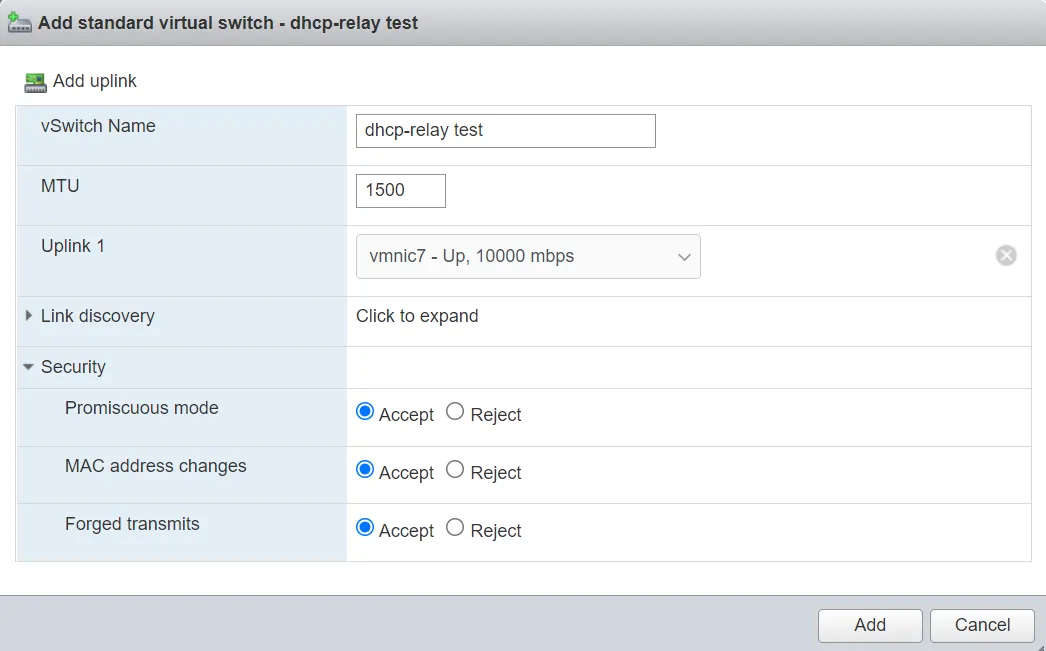
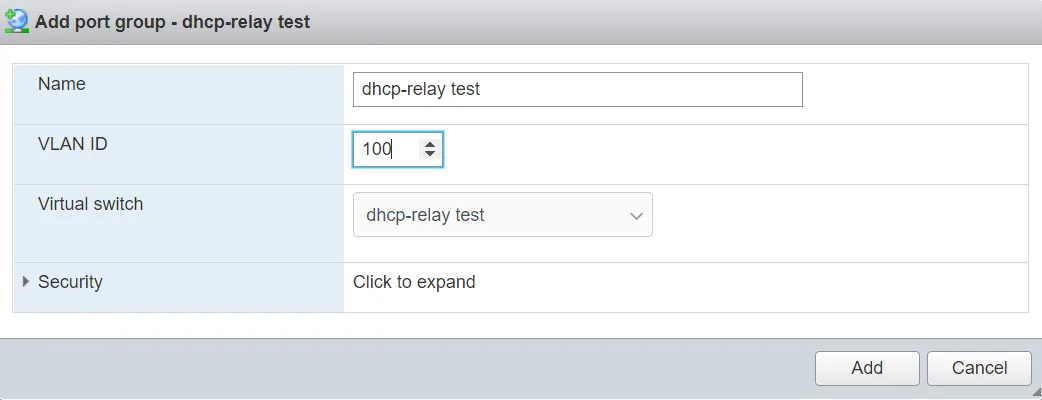
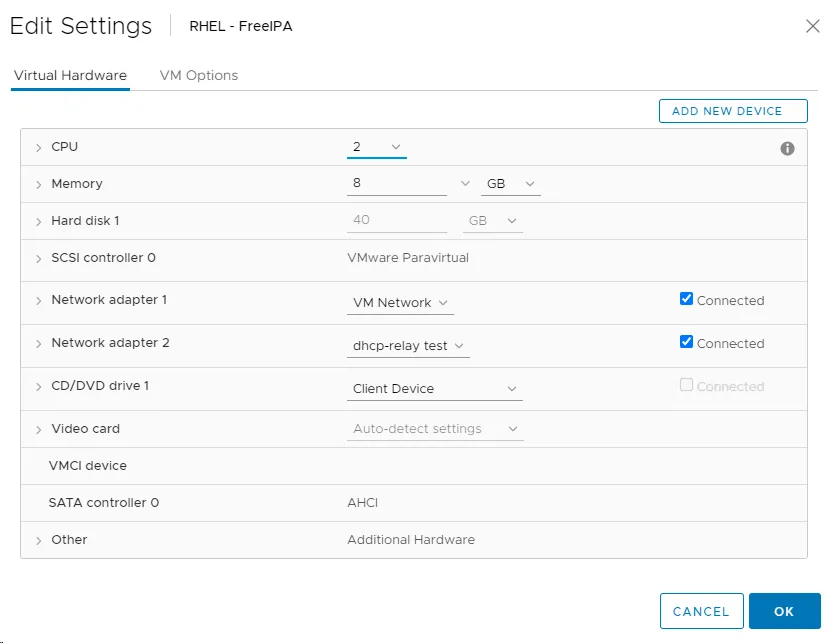
Running the Test
Section titled “Running the Test”Lease Record on RHEL
Section titled “Lease Record on RHEL”[root@freeipa ~]# cat /var/lib/dhcpd/dhcpd.leases# The format of this file is documented in the dhcpd.leases(5) manual page.# This lease file was written by isc-dhcp-4.3.6
# authoring-byte-order entry is generated, DO NOT DELETEauthoring-byte-order little-endian;
server-duid "\000\001\000\001)A@\255\000PV\276\261\016";
lease 192.168.99.100 { starts 1 2021/12/06 21:50:25; ends 2 2021/12/07 21:50:25; cltt 1 2021/12/06 21:50:25; binding state active; next binding state free; rewind binding state free; hardware ethernet 88:6f:d4:98:b7:b1; option agent.circuit-id "Vlan99"; option agent.remote-id "20:04:0f:06:44:b4"; client-hostname "OS10";}tcpdump from SONiC
Section titled “tcpdump from SONiC”Shows DHCP transiting the relay.
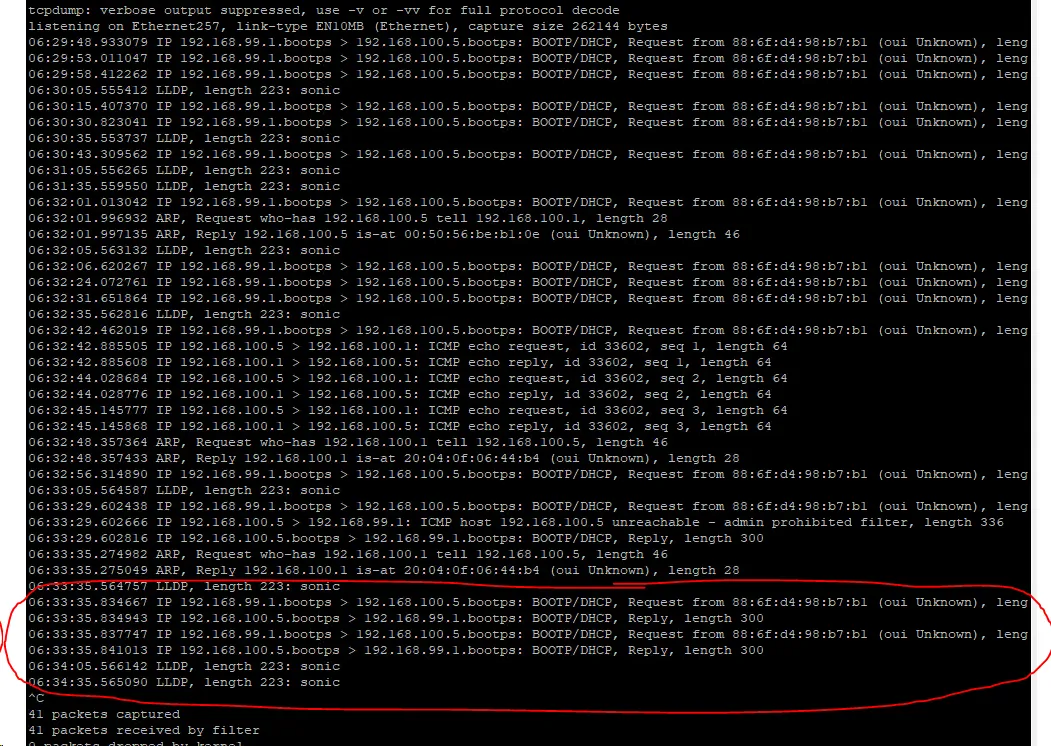
Address Info From OS10
Section titled “Address Info From OS10”OS10(conf-if-vl-99)# do show ip interface briefInterface Name IP-Address OK Method Status Protocol=========================================================================================Ethernet 1/1/1 unassigned NO unset up downEthernet 1/1/2 unassigned NO unset up downEthernet 1/1/3 unassigned NO unset up downEthernet 1/1/4 unassigned NO unset up downEthernet 1/1/5 unassigned NO unset up downEthernet 1/1/6 unassigned NO unset up downEthernet 1/1/7 unassigned NO unset up downEthernet 1/1/8 unassigned NO unset up downEthernet 1/1/9 unassigned NO unset up downEthernet 1/1/10 unassigned NO unset up downEthernet 1/1/11 unassigned NO unset up downEthernet 1/1/12 unassigned NO unset up downEthernet 1/1/13 unassigned YES unset up upEthernet 1/1/14 unassigned NO unset up downEthernet 1/1/15 unassigned NO unset up downManagement 1/1/1 192.168.1.24/24 YES manual up upVlan 1 unassigned NO unset up downVlan 99 192.168.99.100/24 YES DHCP up up