Running DNS from OS10
View on GitHubRunning DNS from OS10
Physical Configuration
Section titled “Physical Configuration”OS10# show versionDell EMC Networking OS10 EnterpriseCopyright (c) 1999-2020 by Dell Inc. All Rights Reserved.OS Version: 10.5.1.3Build Version: 10.5.1.3.190Build Time: 2020-06-19T21:48:07+0000System Type: S4112F-ONArchitecture: x86_64Up Time: 00:30:27Software Configuration
Section titled “Software Configuration”OS10(config)# configure terminalOS10(config)# ip name-server 192.168.1.6OS10(config)# interface vlan 1OS10(conf-if-vl-1)# ip address 192.168.1.26/24OS10(conf-if-vl-1)# exitOS10(config)# ip route 0.0.0.0/0 192.168.1.6 interface vlan1OS10(config)# endOS10# system bashsudo passwd rootsu -sudo apt-get update -y && sudo apt-get install dnsmasq vim dnsutilsvim /etc/hostsInside of /etc/hosts add some random entry. I added 192.168.1.26 testrouter.lan
Run :wq! to save and exit vim
Inside of my config /etc/resolv.conf had an erroneous search entry. I had to clear that out to ensure it was valid.
Now run systemctl start dnsmasq
Test on another host
Section titled “Test on another host”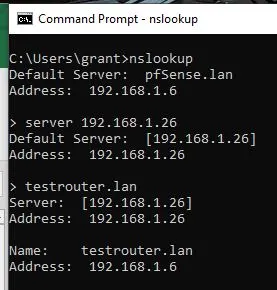
Warning!
Section titled “Warning!”I have only tried this with VLAN interfaces which show up as a bridge with an IP under the hood. I’m not sure if you apply an IP address directly to an interface that it would still work. Would have to test it.