Get NVMe Drives from iDRAC Redfish
View on GitHubGet NVMe Drives from iDRAC Redfish
Exploring iDRAC Detected Storage
Section titled “Exploring iDRAC Detected Storage”I used the Storage API endpoint to accomplish this.
From my host I received:
{"@odata.context":"/redfish/v1/$metadata#StorageCollection.StorageCollection","@odata.id":"/redfish/v1/Systems/System.Embedded.1/Storage/","@odata.type":"#StorageCollection.StorageCollection","Description":"Collection Of Storage entities","Members":[{"@odata.id":"/redfish/v1/Systems/System.Embedded.1/Storage/RAID.Slot.4-1"},{"@odata.id":"/redfish/v1/Systems/System.Embedded.1/Storage/RAID.Embedded.1-1"},{"@odata.id":"/redfish/v1/Systems/System.Embedded.1/Storage/CPU.1"},{"@odata.id":"/redfish/v1/Systems/System.Embedded.1/Storage/AHCI.Slot.2-1"}],"Members@odata.count":4,"Name":"Storage Collection"}I’m running an R840 which is Dell 14G which I know does not have NVMe RAID controllers as an option so I know my NVMe drives must be hanging off the CPU. IE: /redfish/v1/Systems/System.Embedded.1/Storage/CPU.1. I can expect that the BOSS card is hanging off of AHCI and that any SAS/SATA drives are likely on the RAID controller. The results above also imply that the host above runs a mixed backplane given the presence of RAID and CPU.1. Checking CPU.1 gets me:
{ "@odata.context": "/redfish/v1/$metadata#Storage.Storage", "@odata.id": "/redfish/v1/Systems/System.Embedded.1/Storage/CPU.1", "@odata.type": "#Storage.v1_8_0.Storage", "Description": "CPU.1", "Drives": [ { "@odata.id": "/redfish/v1/Systems/System.Embedded.1/Storage/CPU.1/Drives/Disk.Bay.21:Enclosure.Internal.0-1" }, { "@odata.id": "/redfish/v1/Systems/System.Embedded.1/Storage/CPU.1/Drives/Disk.Bay.19:Enclosure.Internal.0-1" }, { "@odata.id": "/redfish/v1/Systems/System.Embedded.1/Storage/CPU.1/Drives/Disk.Bay.20:Enclosure.Internal.0-1" }, { "@odata.id": "/redfish/v1/Systems/System.Embedded.1/Storage/CPU.1/Drives/Disk.Bay.23:Enclosure.Internal.0-1" }, { "@odata.id": "/redfish/v1/Systems/System.Embedded.1/Storage/CPU.1/Drives/Disk.Bay.18:Enclosure.Internal.0-1" }, { "@odata.id": "/redfish/v1/Systems/System.Embedded.1/Storage/CPU.1/Drives/Disk.Bay.22:Enclosure.Internal.0-1" } ], "Drives@odata.count": 6, "Id": "CPU.1", "Links": { "Enclosures": [ { "@odata.id": "/redfish/v1/Chassis/Enclosure.Internal.0-1" }, { "@odata.id": "/redfish/v1/Chassis/System.Embedded.1" } ], "Enclosures@odata.count": 2 }, "Name": "CPU.1", "Status": { "Health": "OK", "HealthRollup": "OK", "State": "Enabled" }, "Volumes": { "@odata.id": "/redfish/v1/Systems/System.Embedded.1/Storage/CPU.1/Volumes" }}From the above I can deduce that CPU 1 has six drives attached to it. Or does it?
Understand the Behavior of Unqualified Drives
Section titled “Understand the Behavior of Unqualified Drives”Here is a picture of the front of my server:
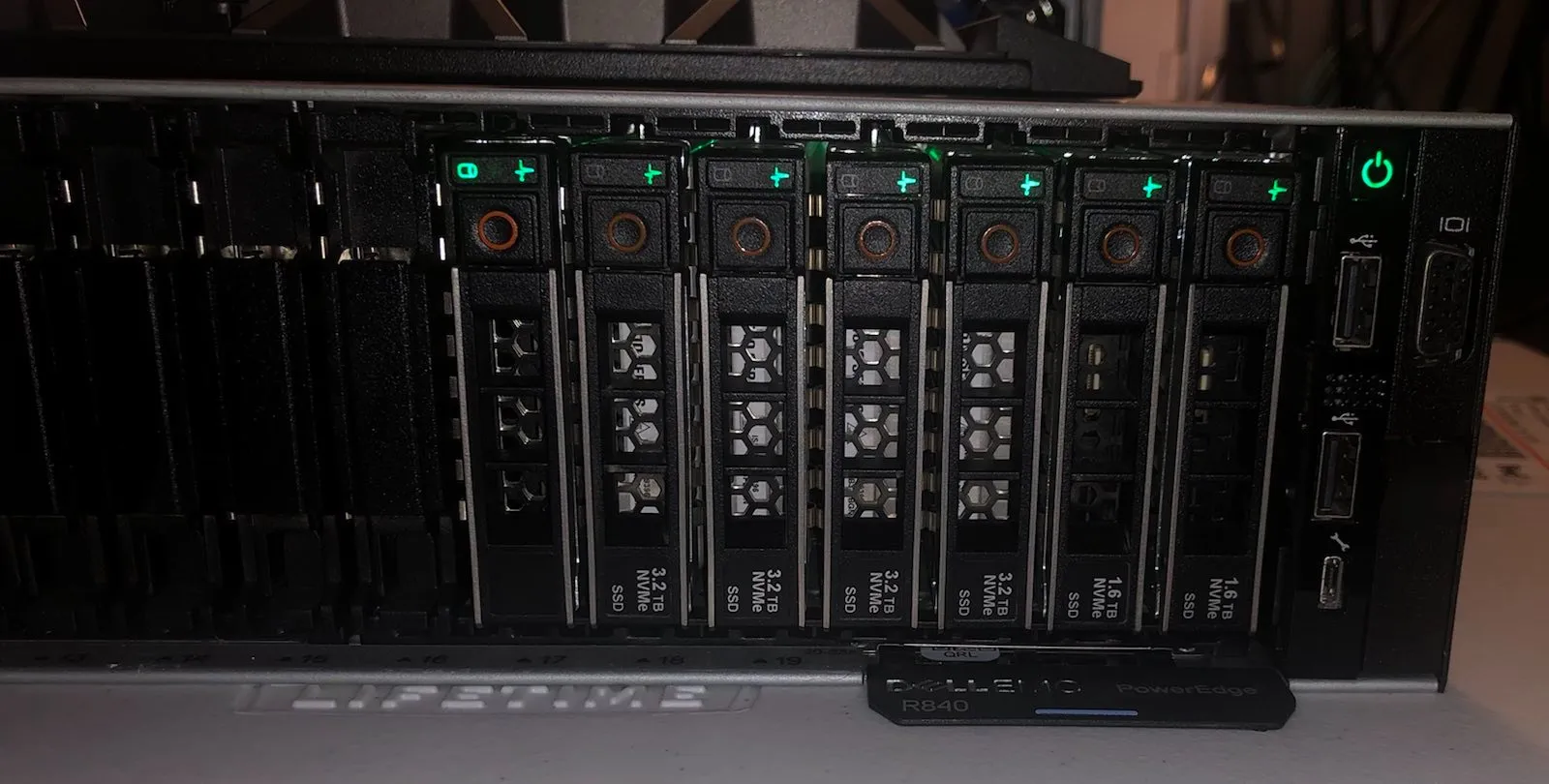
Here is the front of my server. You might say, “Wait, there are 7 drives!?” The problem is this 7th drive isn’t qualified by Dell. It will still work just fine however, iDRAC won’t know how to talk to it so it won’t show up:
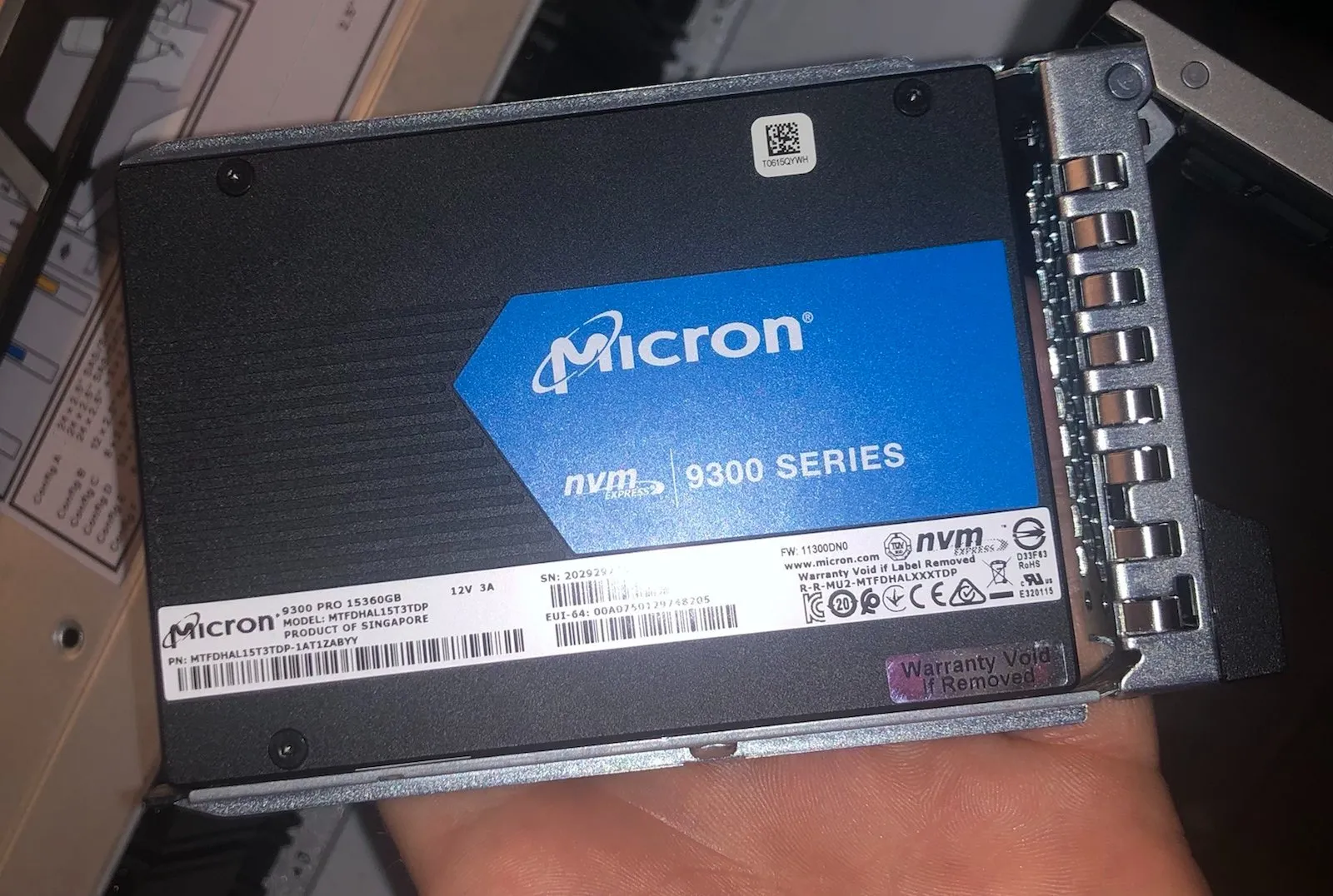
You can confirm this is the case by checking the Storage->Physical Disks tab inside the iDRAC itself:
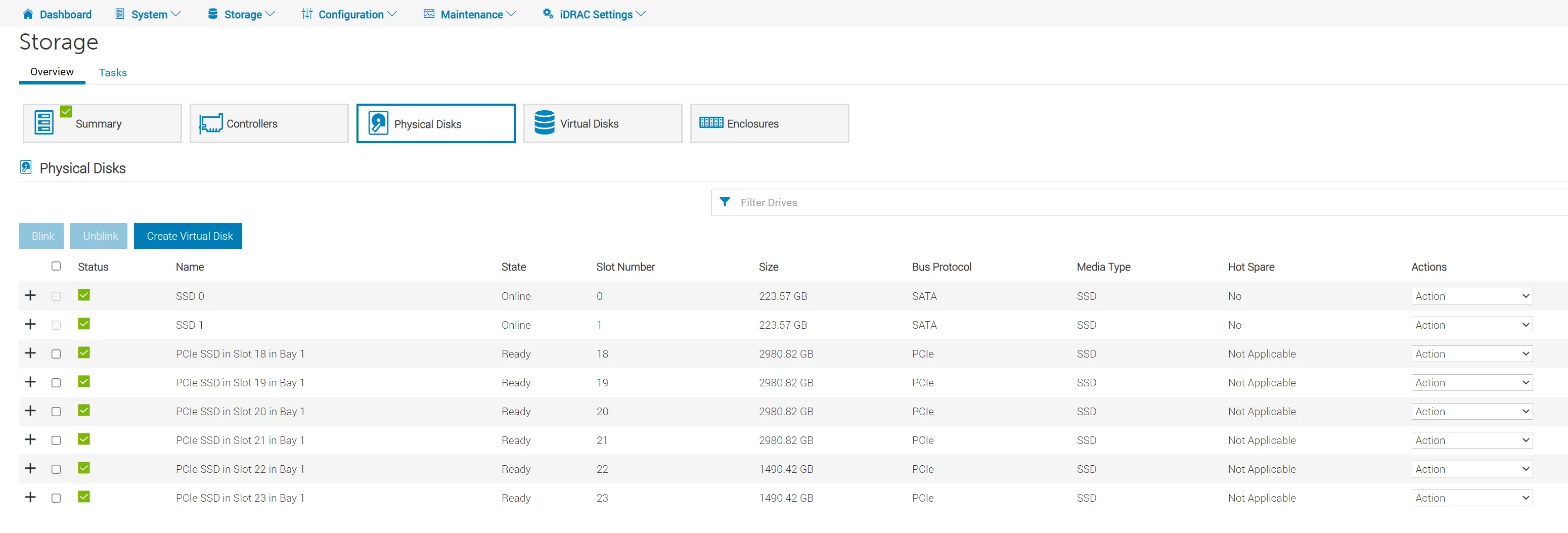
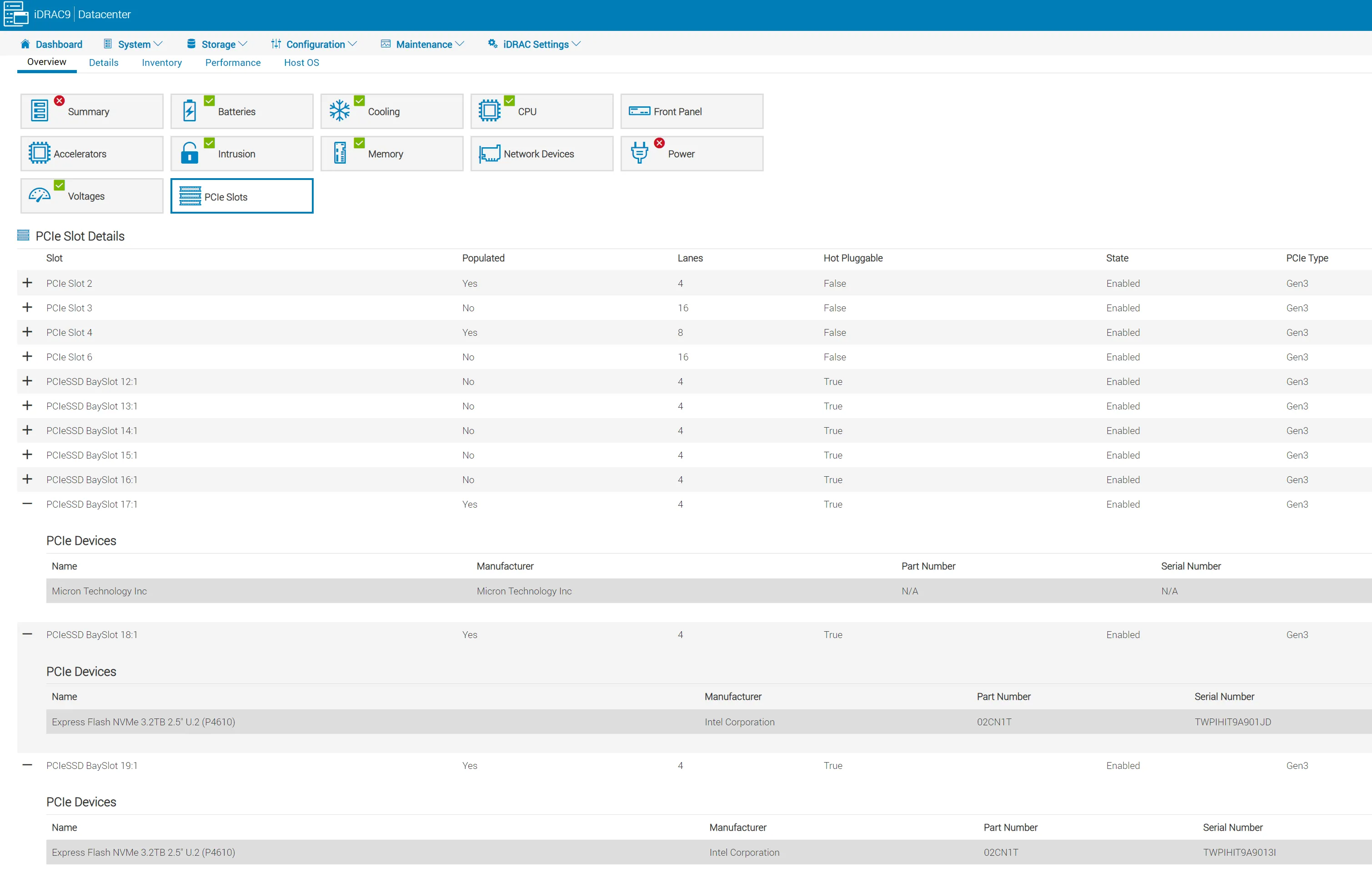
Here you can see that I only have the 6 NVMe drives plus two SATA SSDs. While the iDRAC’s personality module won’t be able to properly sort the drive into Storage it will detect it as a PCIe device and accurately read the vendor information:
Getting a Drive’s Stats
Section titled “Getting a Drive’s Stats”We can select one of them with /redfish/v1/Systems/System.Embedded.1/Storage/CPU.1/Drives/Disk.Bay.21:Enclosure.Internal.0-1.
This achieves the desired result and gets a dump of that drive’s data. The size is available under the field CapacityBytes.
{ "@odata.context": "/redfish/v1/$metadata#Drive.Drive", "@odata.id": "/redfish/v1/Systems/System.Embedded.1/Storage/CPU.1/Drives/Disk.Bay.21:Enclosure.Internal.0-1", "@odata.type": "#Drive.v1_9_0.Drive", "Actions": { "#Drive.SecureErase": { "@Redfish.OperationApplyTimeSupport": { "@odata.type": "#Settings.v1_3_0.OperationApplyTimeSupport", "SupportedValues": [ "Immediate", "OnReset" ] }, "target": "/redfish/v1/Systems/System.Embedded.1/Storage/CPU.1/Drives/Disk.Bay.21:Enclosure.Internal.0-1/Actions/Drive.SecureErase" } }, "Assembly": { "@odata.id": "/redfish/v1/Chassis/System.Embedded.1/Assembly" }, "BlockSizeBytes": 0, "CapableSpeedGbs": 7.876923076923077, "CapacityBytes": 3200631791616, "Description": "PCIe SSD in Slot 21 in Bay 1", "EncryptionAbility": "None", "EncryptionStatus": "Unencrypted", "FailurePredicted": false, "HotspareType": "None", "Id": "Disk.Bay.21:Enclosure.Internal.0-1", "Identifiers": [ { "DurableName": null, "DurableNameFormat": null } ], "Identifiers@odata.count": 1, "Links": { "Chassis": { "@odata.id": "/redfish/v1/Chassis/Enclosure.Internal.0-1" }, "PCIeFunctions": [], "PCIeFunctions@odata.count": 0, "Volumes": [ { "@odata.id": "/redfish/v1/Systems/System.Embedded.1/Storage/CPU.1/Volumes/Disk.Bay.21:Enclosure.Internal.0-1" } ], "Volumes@odata.count": 1 }, "Location": [], "Manufacturer": "Intel Corporation ", "MediaType": "SSD", "Model": "Dell Express Flash NVMe P4610 3.2TB SFF", "Name": "PCIe SSD in Slot 21 in Bay 1", "NegotiatedSpeedGbs": 7.876923076923077, "Oem": { "Dell": { "@odata.type": "#DellOem.v1_1_0.DellOemResources", "DellDriveSMARTAttributes": null, "DellNVMeSMARTAttributes": { "@odata.id": "/redfish/v1/Systems/System.Embedded.1/Storage/CPU.1/Drives/Disk.Bay.21:Enclosure.Internal.0-1/Oem/Dell/DellNVMeSMARTAttributes" }, "DellPCIeSSD": { "@odata.context": "/redfish/v1/$metadata#DellPCIeSSD.DellPCIeSSD", "@odata.id": "/redfish/v1/Systems/System.Embedded.1/Storage/CPU.1/Drives/Disk.Bay.21:Enclosure.Internal.0-1/Oem/Dell/DellPCIeSSDs/Disk.Bay.21:Enclosure.Internal.0-1", "@odata.type": "#DellPCIeSSD.v1_4_0.DellPCIeSSD", "Bus": "CA", "BusProtocol": "PCIE", "Description": "An instance of DellPCIeSSD will have PCIe Solid State Drive specific data.", "Device": "0", "DeviceProtocol": "NVMe-MI1.0", "DriveFormFactor": "2.5Inch", "FreeSizeInBytes": null, "Function": "0", "HotSpareStatus": null, "Id": "Disk.Bay.21:Enclosure.Internal.0-1", "MediaType": "SolidStateDrive", "Name": "DellPCIeSSD", "PCIeCapableLinkWidth": "x4", "PCIeNegotiatedLinkWidth": "x4", "ProductID": "a54", "RAIDType": "Unknown", "RaidStatus": null, "Slot": 21, "SystemEraseCapability": "CryptographicErasePD", "UsedSizeInBytes": 0 }, "DellPhysicalDisk": { "@odata.context": "/redfish/v1/$metadata#DellPhysicalDisk.DellPhysicalDisk", "@odata.id": "/redfish/v1/Systems/System.Embedded.1/Storage/CPU.1/Drives/Disk.Bay.21:Enclosure.Internal.0-1/Oem/Dell/DellDrives/Disk.Bay.21:Enclosure.Internal.0-1", "@odata.type": "#DellPhysicalDisk.v1_3_0.DellPhysicalDisk", "Certified": null, "Connector": null, "Description": "An instance of DellPhysicalDisk will have Physical Disk specific data.", "DeviceProtocol": "NVMe-MI1.0", "DriveFormFactor": "2.5Inch", "EncryptionProtocol": null, "ForeignKeyIdentifier": null, "FreeSizeInBytes": null, "Id": "Disk.Bay.21:Enclosure.Internal.0-1", "LastSystemInventoryTime": null, "LastUpdateTime": null, "ManufacturingDay": null, "ManufacturingWeek": null, "ManufacturingYear": null, "Name": "DellPhysicalDisk", "NonRAIDDiskCachePolicy": null, "OperationName": null, "OperationPercentCompletePercent": null, "PCIeCapableLinkWidth": "x4", "PCIeNegotiatedLinkWidth": "x4", "PPID": null, "PowerStatus": null, "PredictiveFailureState": null, "ProductID": "a54", "RAIDType": "Unknown", "RaidStatus": null, "SASAddress": null, "Slot": 21, "SystemEraseCapability": "CryptographicErasePD", "T10PICapability": null, "UsedSizeInBytes": 0, "WWN": null } } }, "Operations": [], "Operations@odata.count": 0, "PartNumber": "TW02CN1TPIHIT9A9013TA02", "PhysicalLocation": { "PartLocation": { "LocationOrdinalValue": 21, "LocationType": "Slot" } }, "PredictedMediaLifeLeftPercent": 100, "Protocol": "PCIe", "Revision": "VDV1DP23", "RotationSpeedRPM": null, "SerialNumber": "PHLN9396002Q3P2BGN", "Status": { "Health": "OK", "HealthRollup": "OK", "State": "Enabled" }, "WriteCacheEnabled": false}