Dell OS10 Load Balancing with LAG Config
View on GitHubLoad Balance Testing on 4112F-ON/OS10/Test Case 4
In this test case the goal is to create a simple load balancer using a reverse LAG port. The idea is to have one input port which is then mirrored to a logical LAG port and at the other end of the LAG port is a number of security sensors.
After test 3 I added the command:
OS10(config)# enhanced-hashing resilient-hashing lagHelpful Links
Section titled “Helpful Links”ONIE Network Install Process Overview
My Configuration
Section titled “My Configuration”General Configuration
Section titled “General Configuration”- ONIE host is running RHEL 8
- I am using a Dell S4112F-ON for testing
- OS10 10.5.0.2
- PFSense running DNS and DHCP as services
RHEL Release Info
Section titled “RHEL Release Info”NAME="Red Hat Enterprise Linux"VERSION="8.0 (Ootpa)"ID="rhel"ID_LIKE="fedora"VERSION_ID="8.0"PLATFORM_ID="platform:el8"PRETTY_NAME="Red Hat Enterprise Linux 8.0 (Ootpa)"ANSI_COLOR="0;31"CPE_NAME="cpe:/o:redhat:enterprise_linux:8.0:GA"HOME_URL="https://www.redhat.com/"BUG_REPORT_URL="https://bugzilla.redhat.com/"
REDHAT_BUGZILLA_PRODUCT="Red Hat Enterprise Linux 8"REDHAT_BUGZILLA_PRODUCT_VERSION=8.0REDHAT_SUPPORT_PRODUCT="Red Hat Enterprise Linux"REDHAT_SUPPORT_PRODUCT_VERSION="8.0"Red Hat Enterprise Linux release 8.0 (Ootpa)Red Hat Enterprise Linux release 8.0 (Ootpa)OS 10 Version
Section titled “OS 10 Version”OS10# show versionDell EMC Networking OS10 EnterpriseCopyright (c) 1999-2019 by Dell Inc. All Rights Reserved.OS Version: 10.5.0.2Build Version: 10.5.0.2.468Build Time: 2019-10-19T00:29:00+0000System Type: S4112F-ONArchitecture: x86_64Up Time: 00:03:39Setup ONIE Prerequisites
Section titled “Setup ONIE Prerequisites”See ONIE Install Setup for instructions.
Configure Management Interface
Section titled “Configure Management Interface”See Configure Management Interface on Dell OS10
Configure Device for LAG
Section titled “Configure Device for LAG”Physical Configuration
Section titled “Physical Configuration”- 1, 1Gb/s copper SFP (Ethernet 1/1/1) for input
- 2, 1Gb/s copper SFPs (Ethernet 1/1/5/Ethernet 1/1/10) and 1, 1Gb/s, fiber SFP (Ethernet 1/1/12) for output
Configuration
Section titled “Configuration”! Version 10.5.0.2! Last configuration change at Nov 01 02:25:00 2019!ip vrf default!interface breakout 1/1/13 map 100g-1xinterface breakout 1/1/14 map 100g-1xinterface breakout 1/1/15 map 100g-1xiscsi enableiscsi target port 860iscsi target port 3260system-user linuxadmin password $6$5DdOHYg5$JCE1vMSmkQOrbh31U74PIPv7lyOgRmba1IxhkYibppMXs1KM4Y.gbTPcxyMP/PHUkMc5rdk/ZLv9Sfv3ALtB61enhanced-hashing resilient-hashing lagusername admin password $6$q9QBeYjZ$jfxzVqGhkxX3smxJSH9DDz7/3OJc6m5wjF8nnLD7/VKx8SloIhp4NoGZs0I/UNwh8WVuxwfd9q4pWIgNs5BKH. role sysadmin priv-lvl 15aaa authentication login default localaaa authentication login console local!class-map type application class-iscsi!policy-map type application policy-iscsi!interface vlan1no shutdown!interface port-channel1no shutdownswitchport access vlan 1!interface mgmt1/1/1no shutdownno ip address dhcpip address 192.168.1.20/24ipv6 address autoconfig!interface ethernet1/1/1no shutdownswitchport access vlan 1flowcontrol receive on!interface ethernet1/1/2no shutdownswitchport access vlan 1flowcontrol receive on!interface ethernet1/1/3no shutdownswitchport access vlan 1flowcontrol receive on!interface ethernet1/1/4no shutdownswitchport access vlan 1flowcontrol receive on!interface ethernet1/1/5no shutdownchannel-group 1no switchportspeed 1000flowcontrol receive on!interface ethernet1/1/6no shutdownswitchport access vlan 1flowcontrol receive on!interface ethernet1/1/7no shutdownswitchport access vlan 1flowcontrol receive on!interface ethernet1/1/8no shutdownswitchport access vlan 1flowcontrol receive on!interface ethernet1/1/9no shutdownswitchport access vlan 1speed 1000flowcontrol receive on!interface ethernet1/1/10no shutdownchannel-group 1no switchportspeed 1000flowcontrol receive on!interface ethernet1/1/11no shutdownswitchport access vlan 1flowcontrol receive on!interface ethernet1/1/12no shutdownchannel-group 1no switchportspeed 1000flowcontrol receive on!interface ethernet1/1/13no shutdownswitchport access vlan 1flowcontrol receive on!interface ethernet1/1/14no shutdownswitchport access vlan 1flowcontrol receive on!interface ethernet1/1/15no shutdownswitchport access vlan 1flowcontrol receive on!monitor session 1destination interface port-channel1source interface ethernet1/1/1no shut!snmp-server contact "Contact Support"!telemetryFindings
Section titled “Findings”This time traffic still went to different Wireshark sessions as you can see in the below.
On host 3 you can see the synchronize packet go out with sequence number 3195700332 and you notice that the SYN, ACK response is missing. Look at host 2 and you can see the SYN, ACK with the expected response of 3195700333.
Traffic to Different Wireshark Sessions
Section titled “Traffic to Different Wireshark Sessions”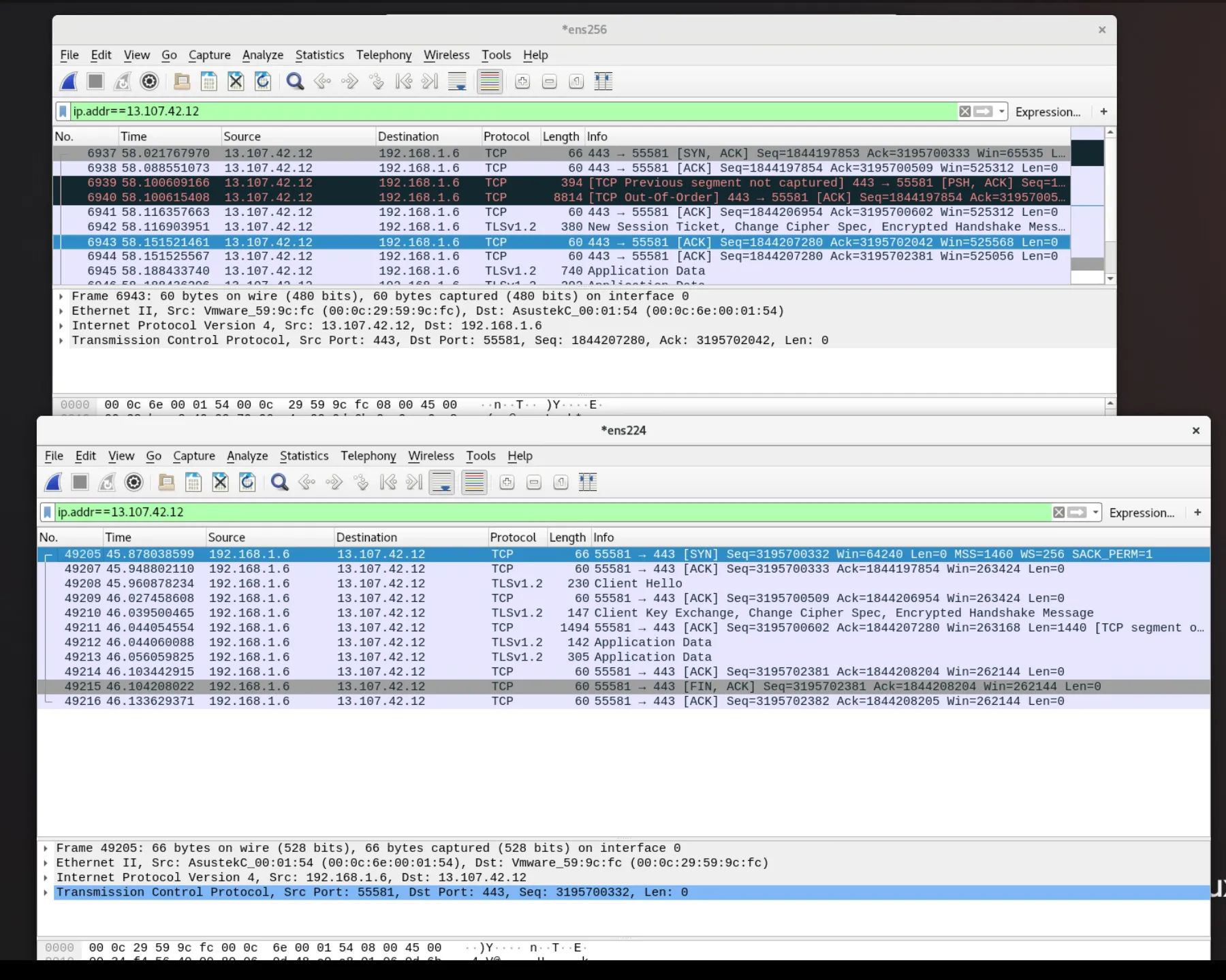
However a session on host 1 seems to work correctly.
Host 1 Session with Correct Output
Section titled “Host 1 Session with Correct Output”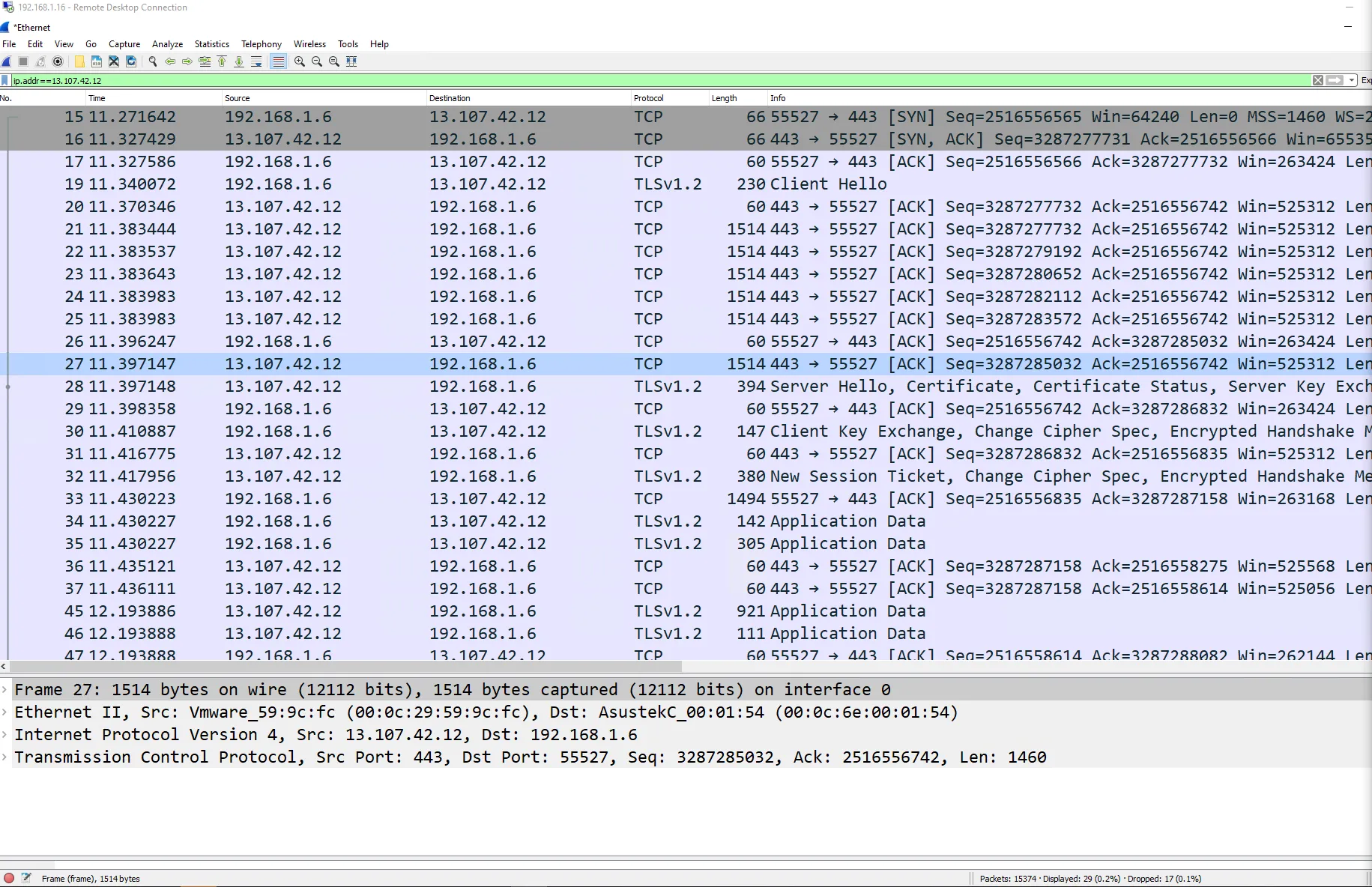
A More Definitive Test
Section titled “A More Definitive Test”I wanted to be sure of my findings so I crafted a new PCAP. This time, I started a capture on my desktop and opened a new connection to vCenter knowing this should generate several new streams. I then closed the browser entirely to ensure those same sessions would close. I saved the capture off and sent it to my traffic replay system.
I then played it back with tcpreplay. I then grabbed a random stream from
the sequence to confirm whether I could see the entire three way hand shake on one
host or not.
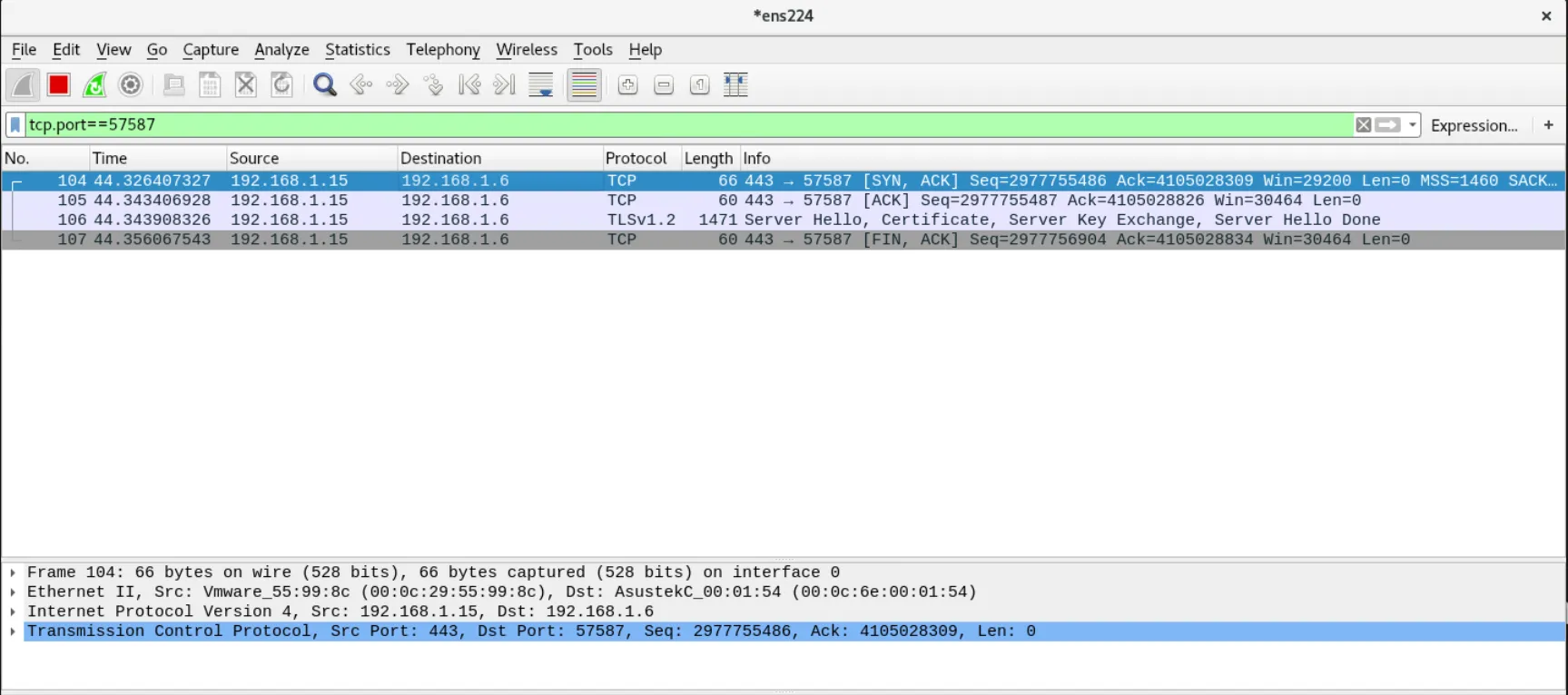
As suspected the initial syn hit one Wireshark session and the response went to a separate Wireshark session.
Host 1
Section titled “Host 1”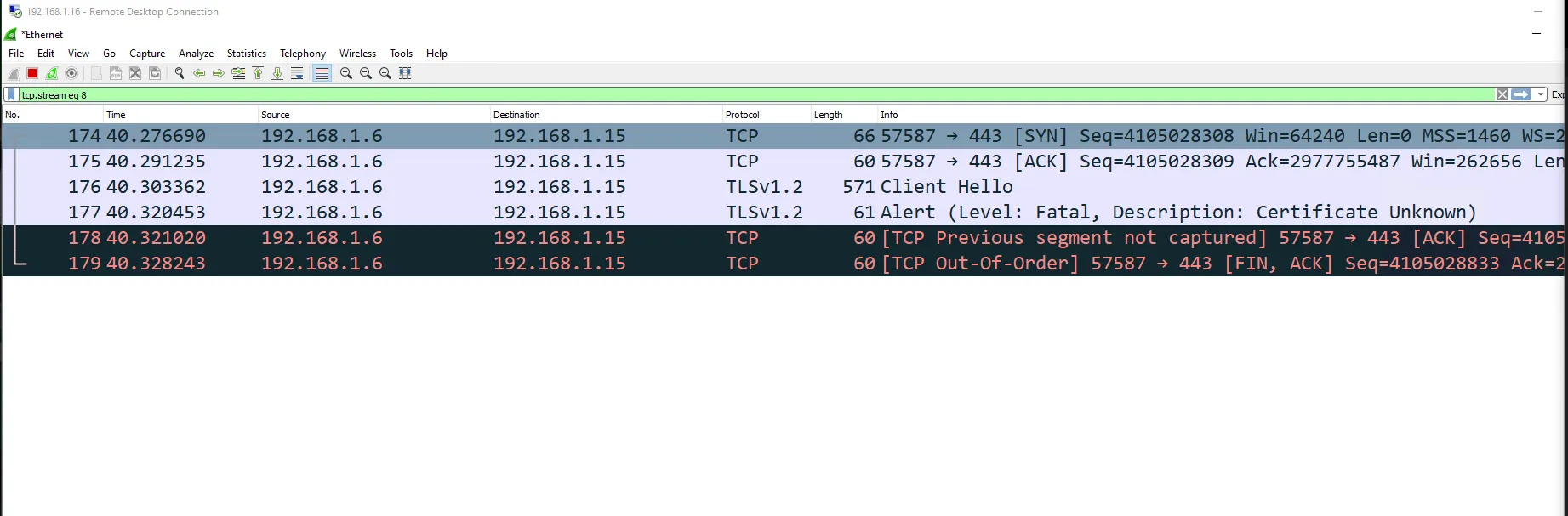
Host 3
Section titled “Host 3”