Enable EPEL and CRB (or PowerTools) repositories
View on GitHubRunning GEM Benchmark
What is Global Environmental Multiscale (GEM) model
Section titled “What is Global Environmental Multiscale (GEM) model”- What is Global Environmental Multiscale (GEM) model
- Background
- Understanding the Benchmark
- Understanding ptopo
- Understanding Grid Decomposition (TODO)
- Install the Benchmark
- Run the Benchmark
- Running on Stampede
Background
Section titled “Background”What are we doing here?
Section titled “What are we doing here?”Given how heady weather is, I think it’s best to start with a problem statement that gets at the heart of what GEM does.
Given the current state of the atmosphere, what will be the future weather hours or weeks from now across different parts of the world.
How are we going to do that?
Section titled “How are we going to do that?”We collect a bunch of observational data from different sources - satellites, weather balloons, surface stations, radar, aircraft - all sorts of stuff - we shove it all into a big equation and then we guess. This is called numerical weather prediction.
Ok, but how does GEM do that?
Section titled “Ok, but how does GEM do that?”NUMERICAL TECHNIQUES
- Horizontal variable-resolution cell-integrated finite-element discretization reducing to the usual staggered finite differences discretization at uniform resolution in spherical geometry.
- Semi-implicit semi-Lagrangian time discretization scheme which removes the overly- restrictive time step limitation imposed by the use of a more conventional Eulerian scheme.
- Hydrostatic-pressure-type hybrid vertical coordinate.
Clear? If your reaction was like mine, probably not. I spent a lot of time reading to wrap my head around this so I’ll break it down for you.
“Horizontal variable-resolution cell-integrated finite-element discretization”
The model breaks the land and atmosphere into grid cells, like tiles on a map — but the cells can be smaller where you want more detail, like over mountains or cities, and larger where less precision is fine, like over the open ocean. Cell-integrated means we calculate the averages over each tile. You can imagine that over the tile there are all sorts of different values, but ultimately, while it reduces our accuracy a bit, we can instead take the average of all of them and use that. Obviously, the smaller the tile, the more accurate we get. Finite-element is a method for solving equations. If we have some irregular shape, we break it down into several simple shapes - e.g. a triangle. Once we have a bunch of triangles, we then solve the equation for each of those triangles instead, then we connect all the pieces together, and then solve those simple equations.
“the usual staggered finite differences discretization”
Ah yes, the usual. Usual here being subjective. Ok, this is a lot of math speak that basically means we would usually do a bunch of partial differentials to calculate the value. The problem is that calculating partial derivatives is expensive. What we do instead is look at all the weather and instead of calculating derivatives, we just look at what is happening nearby and calculate the delta between two points. While this is less accurate than calculating the derivative it is much faster.
“in spherical geometry”
This one is a bit more straightforward. The Earth isn’t flat (probably). GEM’s math has to account for that. Ex: if wind is blowing long distances it has to curve; it doesn’t blow straight.
“Semi-implict semi-Lagrangian time discretization scheme”
There are two ways we can evaluate a fluid - Lagrangian and Eulerian. Lagrangian means you follow the fluid as it moves, taking measurements as you go whereas Eulerian is the opposite. The “observer” is stationary and it takes measurements as the fluid moves past it. The semi-implicit part gets deep into math so I don’t explain it fully here. What matters is that whether has a lot of things which happen quickly. For example, maybe you have a sudden gust of wind. Well the problem is if you assume that the wind is always moving at the gust’s speed you end up being wildly wrong. You kinda want to pay attention to the gust of wind; you want the average of all the gusts basically, but you wouldn’t want to just assume the wind is always gusting. That’s what the semi-implicit is doing. It helps smooth all that out. You could potentially avoid this problem by taking a huge number of measurements. For example, you could check the wind speed every half second, but then your simulation becomes extremely expensive. Ideally, we would rather only calculate what’s happening at larger intervals, for example, 10 minutes.
“Hydrostatic-pressure-type hybrid vertical coordinate”
The vertical layers in GEM are not just at fixed heights. Near the surface, the layers more or less follow the terrain (mountains and valleys for example). However, higher up, they become more like flat slices of constant pressure. That’s why it’s a hybrid system. It blends terrain-following near the ground with pressure levels aloft.
What is a Domain
Section titled “What is a Domain”A domain is a spatial subdomain of the earth’s atmosphere over which the model will compute equations independently. Ultimately, we want to solve for the entire atmosphere, but that’s complicated, so instead we break it down into smaller subdomains. A domain corresponds in our code to a set of configuration files listed under TASK_INPUT/cfg_XXXX ex: cfg_0000, cfg_0001… etc. (TODO check this). This is a specific area of execution.
Understanding the Benchmark
Section titled “Understanding the Benchmark”Understanding Grids
Section titled “Understanding Grids”One of the first things we have to deal with is that the atmosphere is continuous, but computers aren’t so we have to set up our problem to run on processors. We do this by turning the earth into one giant grid coordinate system. These are documented here.
Global Yin-Yang Grid
Section titled “Global Yin-Yang Grid”The yin-yang grid exists to tackle the problem of the poles. When you think about longitude and latitude, what happens is that as you approach the poles the grid boxes created by the lat / longs shrinks significantly. This causes their aspect ratio to skew high leading to numerical instability (when numbers get really really big or way too small in your equations) along with a bunch of other math problem. Effectively what happens is the model sort of falls apart. To avoid this we make two grids that look like this:
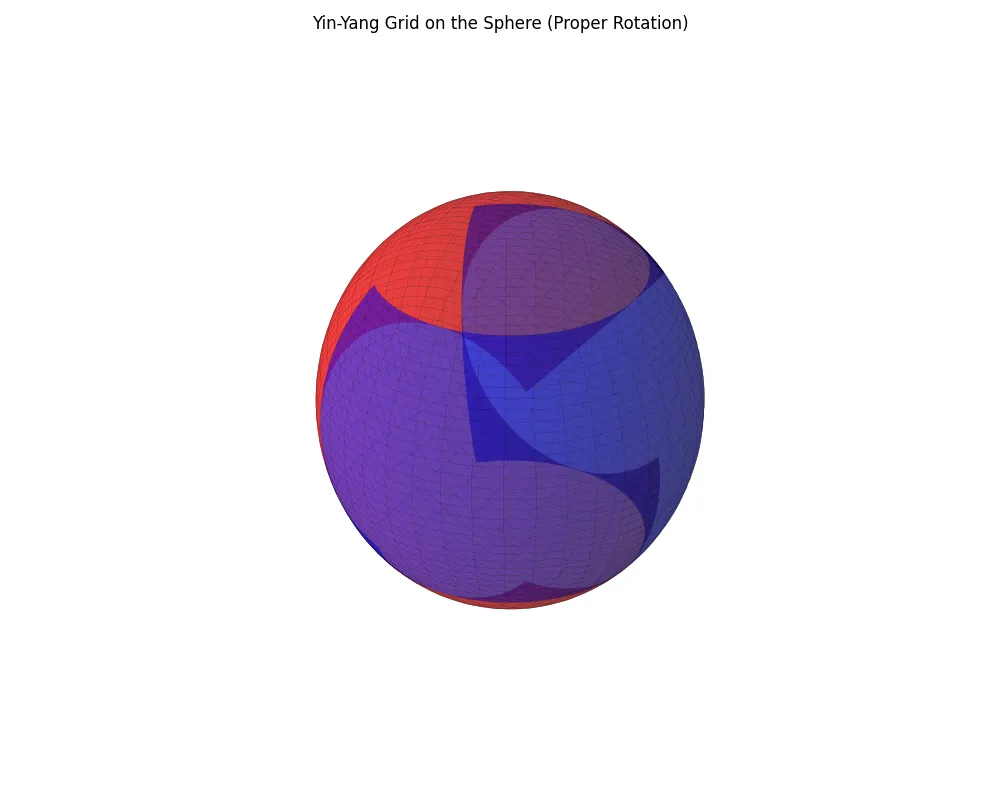
I wrote this code to allow you to visualize how changing Grdc_ni and Grdc_nj will impact the sphere. What you see above is with both set to 60. Here is what it would look like if you set both to 5:
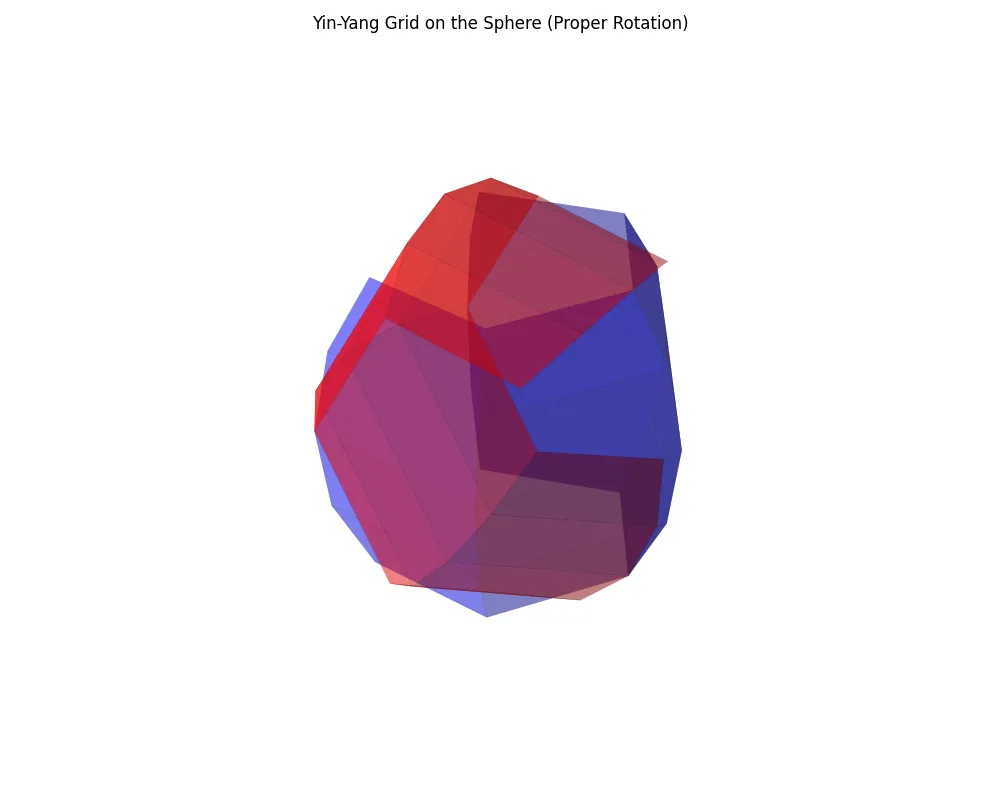
Notice, what you are changing is the number of “grid lines”. You can count them out and see that there are 5 with a total of four cells.
This eliminates the problem of singularities near the pole, gives us a uniform resolution, and makes it so we can easily break the problem down in parallel.
LAM Uniform Grid
Section titled “LAM Uniform Grid”TODO
TLDR: it’s a small, rectangular, lat-long, grid used for regional simulations.
Understanding ptopo
Section titled “Understanding ptopo”Full Callstack
Section titled “Full Callstack”runmod.sh -> rungem.sh -> r.mpirun
runmod.sh
Section titled “runmod.sh”First you run runmod.sh. cclargs_lite breaks down the arguments and then everything is split into components with:
npex=$(echo ${ptopo} | cut -d "x" -f 1)npey=$(echo ${ptopo} | cut -d "x" -f 2)nomp=$(echo ${ptopo} | cut -d "x" -f 3)npex=${npex:-1}npey=${npey:-1}nomp=${nomp:-1}Where npex is the number of MPI processes along the x axis, npey is the number of processes along the Y axis, and nomp is the number of OpenMP threads per MPI rank. This will default to 1 if anything is missing. _npe is a derived value calculated by _npe=$((npex*npey)) containing the total number of MPI ranks.
This all then gets fed into the domain calculation:
export CCARD_ARGS="-dom_start ${DOM} -dom_end ${last_domain} -dom_last ${DOMAIN_end} -npex ${npex} -npey ${npey} -ngrids ${ngrids} -smtdyn $smtdyn -smtphy $smtphy -along_Y ${alongYfirst} -input ${TASK_INPUT} -output ${TASK_OUTPUT}"where:
| Argument | Description |
|---|---|
-dom_start ${DOM} | Starting index of the domain range that this invocation will process. |
-dom_end ${last_domain} | Ending index of the domain range (inclusive). |
-dom_last ${DOMAIN_end} | Final possible domain index; used to check bounds or stop conditions. |
-npex ${npex} | Number of MPI processes (ranks) along the X dimension of the decomposition grid. |
-npey ${npey} | Number of MPI processes (ranks) along the Y dimension. |
-ngrids ${ngrids} | Number of physical grids per domain. E.g., 2 if GRDTYP == GY (Yin-Yang grid), otherwise 1. |
-smtdyn $smtdyn | SMT dynamic (logical thread-level parallelism). Refers (TODO) to how many logical threads are used dynamically (often 0 = off). |
-smtphy $smtphy | SMT physical. The number of physical SMT threads per core (relevant on AIX or similar systems). |
-along_Y ${alongYfirst} | Whether the PE layout prioritizes Y-axis first in the grid (value is .true. or .false.). |
-input ${TASK_INPUT} | Path to input files for the model (namelists, settings, etc). |
-output ${TASK_OUTPUT} | Path where model output files will be written. |
Finally, we call rungem.sh:
printf "\n LAUNCHING rungem.sh for domain: cfg_${domain_number} $(date)\n\n". r.call.dot ${TASK_BIN}/rungem.sh \ -npex $((npex*ngrids)) -npey $npey -nomp $nomp \ -nodespec ${nodespec} \ -dom_start ${DOM} -dom_end ${last_domain} -debug $debug \ -barrier ${barrier} -inorder ${inorder}setmod.sh
Section titled “setmod.sh”TODO
rungem.sh
Section titled “rungem.sh”All of our arguments from runmod.sh are passed and parsed here:
eval `cclargs_lite -D "" $0 \ -npex "1" "1" "[Block partitioning along-x ]"\ -npey "1" "1" "[Block partitioning along-y ]"\ -nomp "1" "1" "[Number of OMP threads ]"\ -nodespec "NoNe" "NoNe" "[Node distribution specification]"\ -dom_start "1" "1" "[Starting domain number ]"\ -dom_end "1" "1" "[Ending domain number ]"\ -inorder "0" "5" "[Ordered listing ]"\ -barrier "0" "0" "[DO NOT run binary ]"\ -debug "0" "gdb" "[Debug option: gdb, ddt ]"\ -_status "ABORT" "ABORT" "[return status ]"\ -_endstep "" "" "[return last time step performed]"\ ++ $arguments`where:
| Argument | Used in rungem.sh | Description |
|---|---|---|
-npex | Used to compute npe_total and passed to r.mpirun. | |
-npey | Used as 2D topology height (Y-axis). | |
-nomp | Used to set OMP_NUM_THREADS. | |
-nodespec | Passed to r.mpirun as node layout specification. | |
-dom_start | Starting domain index (idom loop). | |
-dom_end | Ending domain index. | |
-inorder | Controls how r.mpirun prints output. Enables -inorder -tag -minstdout. | |
-barrier | If set, skips actual run and calls r.barrier for sync only. | |
-debug | If set (e.g., gdb, ddt), passes -debug to r.mpirun. | |
-_status | Used as return flag, updated post-run. | |
-_endstep | Not referenced in this script, likely used externally. (TODO) |
Next we calculate the number of domains and then the total number of MPI ranks. npe_total can be ignored, it is only used in some print output.
ndomains=$((dom_end - dom_start + 1))npe_total=$(( npex * npey * ndomains ))Set the number of OpenMP threads:
export OMP_NUM_THREADS=$nompFinally, we construct the run command:
CMD="${TASK_BIN}/r.mpirun -pgm ${TASK_BIN}/ATM_MOD.Abs -npex $((npex*npey)) -npey $ndomains $INORDER -nodespec ${nodespec} -minstdout ${inorder} -nocleanup"As you start looking at this, there are some things that stick out as confusing. First, what is r.mpirun - you may notice it isn’t part of the codebase. It is gem_mpirun.sh it is just a copy that gets moved into your work directory.
pgm is the program to run. In this case we inject ATM_MOD.Abs which is the main GEM atmosphere executable produced by the build system. Ex:
[grant@rockyvm1 gem]$ find ./ -iname *ATM_MOD*./work-RockyLinux-9.5-x86_64-gnu-11.5.0/RUNMOD/bin/ATM_MOD.AbsNext are npex and npey which at this point you are roughly familiar with. You might ask why is npex set to $((npex*npey)) and npey only set to ndomains? Keep in mind that r.mpirun can only build a 2D, cartesian communicator, but GEM needs three logical axes:
WORLD-X = npex × npey ← passed as –npexWORLD-Y = ndomains ← passed as –npeyYou can think of what is happening here as flattening:
X (columns) = npexY (rows) = npeyZ (domains/nests)= ndomainsThey are later unflattened internally in the code base.
-nodespec - This is interpreted by r.run_in_parallel which seems to be a convienience script written by EC. nodespec will allow you to pass things like skylake:48 to help provide architecture hints.
minstdout is empty by default and controls the amount of output. It just makes sure you don’t overwhelm with log volume on large runs.
nocleanup stops the script from deleting any temporary files in TASK_WORK for debug purposes.
Understanding Grid Decomposition (TODO)
Section titled “Understanding Grid Decomposition (TODO)”Grid decomposition occurs in src/base/domain_decomp.F90. The purpose of this function is to take G_ni and G_nj and decompose them into a Ptopo_npex × Ptopo_npey processor grid
domain_decomp is GEM’s initial domain-partitioning routine.
It slices the global horizontal mesh (G_ni × G_nj) into a , assigns each MPI rank its local tile size and starting indices, and stores those numbers in the global glb_ld module where every solver loop can reach them.
High-level flow (annotated with the key code lines)
Section titled “High-level flow (annotated with the key code lines)”| Step | File lines | What happens |
|---|---|---|
| 0. Initialise | errno = -1 | Assume failure until both directions succeed. |
| 1. Log request | write (Lun_out,1000) G_ni,F_npex,G_nj,F_npey | Prints “DOMAIN_DECOMP: checking partitioning …”. |
| 2. Decompose X (i-direction) | first call to decomp (lines 24-30) | Passes global G_ni, halo width Grd_extension+1, desired sub-domains F_npex; receives:• l_minx,l_maxx (halo-inclusive local bounds)• lnis(:) (local x-sizes for every column of ranks)• l_i0 (my first global i index). |
| 3. Decompose Y (j-direction) | second call to decomp (lines 30-34) | Same for G_nj, returns l_miny,l_maxy, lnjs(:), l_j0. |
| 4. Global success check | rpn_comm_Allreduce | Reduces errno across all ranks (MPI MIN) → function value domain_decomp. |
| 5. Abort on error | if (domain_decomp < 0) | Logs “ILLEGAL DOMAIN PARTITIONING” and exits. |
| 6. Store local sizes | l_ni = lnis(1)l_nj = lnjs(1)l_nk = G_nk | Those l_* variables live in module glb_ld; every dynamics/physics loop uses them. |
| 7. Derive edge-adjusted extents | l_njv, l_niu with if (l_north) … | Handles polar or east-edge staggering quirks. |
| 8. Optional global-position table | if (.not.F_checkparti_L) call glbpos() | Builds look-up arrays mapping each rank’s tile to its position. |
| 9. Debug print per rank | write(Lun_out,2000) … | Shows (myrow,mycol), local size, and global i/j span. |
Why it matters in the model run
Section titled “Why it matters in the model run”- Load balancing: The helper function
decompchooses tile sizes so that each rank processes either ⌈N/P⌉ or ⌊N/P⌋ points (“ALLEQUALLBUT1” or “MOSTUNIFORM” strategy). - Halo awareness: The extra argument
(Grd_extension+1)guarantees every tile owns enough guard-cells for its numerical stencil. - One-time operation: After
domain_decompsucceeds, all subsequent memory allocation (mem_tstp,mem_tracers) and main loops (dynstep,itf_phy_step) rely on the local sizes and indices it recorded.
In short, domain_decomp turns the one big global grid defined by the namelist into 576 (or however many) non-overlapping halo-padded tiles and tells each MPI rank, “These are the i/j rows you own.”
Install the Benchmark
Section titled “Install the Benchmark”Before continuing, make sure your nodes are truly identical. I wrote the helper script check_host_node_types.sh to do this. I was running in a lab and discovered the hard way that not all my hosts were actually the same.
On Your Own Hardware
Section titled “On Your Own Hardware”Install Prerequisites
Section titled “Install Prerequisites”# Enable EPEL and CRB (or PowerTools) repositoriessudo dnf install -y epel-releasesudo dnf config-manager --set-enabled crb || sudo dnf config-manager --set-enabled powertools
# Install development tools and general build dependenciessudo dnf groupinstall -y "Development Tools"sudo dnf install -y \ gcc \ gcc-c++ \ gcc-gfortran \ cmake \ git \ make \ pkgconf \ which \ expat \ expat-devel \ texinfo \ doxygen \ libxml2-devel \ fftw-devel \ netcdf \ netcdf-devel \ netcdf-fortran \ netcdf-fortran-devel \ hdf5 \ hdf5-devel \ blas \ blas-devel \ lapack \ lapack-devel
# Install MPI (OpenMPI)sudo dnf install -y openmpi openmpi-devel
# Add OpenMPI to shell path (permanent)echo 'export PATH=/usr/lib64/openmpi/bin:$PATH' >> ~/.bashrcecho 'export LD_LIBRARY_PATH=/usr/lib64/openmpi/lib:$LD_LIBRARY_PATH' >> ~/.bashrcsource ~/.bashrcInstall librmn
Section titled “Install librmn”cd ~git clone https://github.com/ECCC-ASTD-MRD/librmn.gitcd librmngit checkout alphagit submodule update --init --recursive
mkdir buildcd buildcmake -DCMAKE_INSTALL_PREFIX=$HOME/librmn-install ..make -j$(nproc)make installInstall sverif
Section titled “Install sverif”cd ~git clone https://github.com/ECCC-ASTD-MRD/sverif.gitcd sverifgit submodule update --init --recursive
mkdir buildcd buildcmake -Drmn_ROOT=$HOME/librmn-install -DCMAKE_INSTALL_PREFIX=$HOME/sverif-install ..make -j$(nproc)make install
# Add to PATH (permanent)echo 'export PATH=$HOME/sverif-install/bin:$PATH' >> ~/.bashrcexport PATH=$HOME/sverif-install/bin:$PATHClone and Build GEM (Method 2)
Section titled “Clone and Build GEM (Method 2)”cd ~git clone https://github.com/ECCC-ASTD-MRD/gem.gitcd gemgit checkout benchmark-5.3git submodule update --init --recursive
# Download necessary databases for model execution and benchmarking./download-dbase.sh ../download-dbase-benchmarks.sh .
# Set up environment (use "gnu" unless you know otherwise). ./.common_setup gnu
# Use Method 2: Set up architecture-specific build + work directories. ./.initial_setup
# Compile GEM with architecture detection# cado is a custom script unique to gemcado cmakecado work -jTexas Advanced Compute Center
Section titled “Texas Advanced Compute Center”module load autotools/1.4 pmix/3.2.3 xalt/3.1 TACC gcc/13.2.0 impi/21.12 fftw3/3.3.10 cmake/3.29.5 mkl/24.1git clone --recursive https://github.com/ECCC-ASTD-MRD/gem.gitln -s /scratch/tacc/apps/gcc13_2/impi21/fftw3/3.3.10/include/* src/gemdyn/gemdyn/CMakeFiles/gemdyn.dir/base/cd gemgit submodule update --init --recursive./download-dbase.sh ../download-dbase-benchmarks.sh .. ./.common_setup gnumkdir buildcd buildcmake ..make -j$(nproc)make work -j$(nproc)git checkout benchmark-5.3 # Grant note: I actually did the build without the benchmark branch - I did it in master because # master is broken. You get the fallow-argument-mismatch errorVerify the Work Directory
Section titled “Verify the Work Directory”Check that work-[OS]-[COMPILER] was created:
ls work-*Run the Benchmark
Section titled “Run the Benchmark”Using findtopo
Section titled “Using findtopo”findtopo -npex_low 1 -npex_high 96 -npey_low 1 -npey_high 96 -omp 1 -smt 1 -corespernode 32 -nml configurations/GEM_cfgs_GY_4km/cfg_0000/gem_settings.nml > topo.txt- TODO explain what all this is doing
Running in a New Environment
Section titled “Running in a New Environment”CRITICAL: Consider that when you do the math for ptopo you must take into account the fact that this is a ying yang grid so whatever you do will ultimately be multiplied by two. You can see this is the []runmod.sh](https://github.com/ECCC-ASTD-MRD/gem/blob/benchmark-5.3/scripts/runmod.sh) code:
if [ "$GRDTYP" == "GY" ] ; then ngrids=2 ; fiAfter some experimentation I saw errors like:
Error allocating 1 308 694 400–1 530 000 000 bytes: Cannot allocate memorywhen I tried to run against nodes. The way that’s formatted is rather confusing, but what it means is it tried to allocate 1.22-1.43GBs of memory (if you do the math to convert from bytes). While I haven’t exhaustively reversed this, I’m fairly confident this occurs in set_sol.F90
# Step 1: Go to the GEM source directorycd ~/gem   # Or wherever you cloned the repo
# Step 2: Source the compiler environment. ./.common_setup gnu
# Step 3: Set GEM_WORK and switch to the working dircd work-RockyLinux-9.5-x86_64-gnu-11.5.0export GEM_WORK=$(pwd)export GOAS_SCRIPT=""
# Step 4: Run with small topology (1x1x1)../scripts/runmod.sh -dircfg configurations/GEM_cfgs_GY_4km -ptopo 1x1x1
Running on Stampede
Section titled “Running on Stampede”Compiling
Section titled “Compiling”git clone --recursive https://github.com/ECCC-ASTD-MRD/gem.gitgit checkout benchmark-5.3git submodule update --init --recursive./download-dbase.sh ../download-dbase-benchmarks.sh .# start cleanmodule purge
# Intel oneAPI compilers + MKL + Intel MPI (already default-loaded on login,# but make it explicit so batch jobs pick it up)module load intel/24.0 # ifx / icx + MKLmodule load impi/21.11 # Intel MPI matching the 24.x compilers
# Runtime libraries the model expectsmodule load fftw3/3.3.10 # built with Intel, gives the FFTW3 headers/libsmodule load hdf5/1.14.4 # pulls in zlib automaticallymodule load netcdf/4.9.2 # C + Fortran interfaces linked to the same HDF5module load zlib/1.3.1 # only needed when you link static, safe to load
# Build toolsmodule load cmake/3.31.5 # ≥3.20 required
. ./.common_setup gnu
mkdir -p $HOME/soft/fftw # anything under $HOME is fine
# 2) Point CMake to a directory called “…/include”# (CMake always looks for PREFIX/include/fftw3.h)ln -s /opt/apps/intel24/fftw3/3.3.10/include $HOME/soft/fftw/include
# 3) Do the same for the library directory so the later# find_library() call succeedsln -s /opt/apps/intel24/fftw3/3.3.10/lib $HOME/soft/fftw/lib
# 4) Tell CMake that “$HOME/soft/fftw” is one of its prefixesexport CMAKE_PREFIX_PATH=$HOME/soft/fftw:$CMAKE_PREFIX_PATH
cd gemmkdir buildcd buildcmake ..make -j$(nproc)make work -j$(nproc)git checkout benchmark-5.3 # Grant note: I actually did the build without the benchmark branch - I did it in master because # master is broken. You get the fallow-argument-mismatch error