idrac with LDAP
Version Info
Section titled “Version Info”Fedora release 33 (Thirty Three)NAME=FedoraVERSION="33 (Workstation Edition)"ID=fedoraVERSION_ID=33VERSION_CODENAME=""PLATFORM_ID="platform:f33"PRETTY_NAME="Fedora 33 (Workstation Edition)"ANSI_COLOR="0;38;2;60;110;180"LOGO=fedora-logo-iconCPE_NAME="cpe:/o:fedoraproject:fedora:33"HOME_URL="https://fedoraproject.org/"DOCUMENTATION_URL="https://docs.fedoraproject.org/en-US/fedora/f33/system-administrators-guide/"SUPPORT_URL="https://fedoraproject.org/wiki/Communicating_and_getting_help"BUG_REPORT_URL="https://bugzilla.redhat.com/"REDHAT_BUGZILLA_PRODUCT="Fedora"REDHAT_BUGZILLA_PRODUCT_VERSION=33REDHAT_SUPPORT_PRODUCT="Fedora"REDHAT_SUPPORT_PRODUCT_VERSION=33PRIVACY_POLICY_URL="https://fedoraproject.org/wiki/Legal:PrivacyPolicy"VARIANT="Workstation Edition"VARIANT_ID=workstationFedora release 33 (Thirty Three)Fedora release 33 (Thirty Three)Setup FreeIPA
Section titled “Setup FreeIPA”- Install Fedora
- Change hostname
1.
hostname freeipa.grant.lan && hostnamectl set-hostname freeipa.grant.lan2.Change in /etc/hostname 3.Configure DNS to return for this hostname. Double check withdig +short freeipa.grant.lan A && dig +short -x 192.168.1.95 - Follow RHEL’s instructions 1.I used Chapter 5 for primary installation 2.Make sure you add the requested DNS entries at the end
- Run
firewall-cmd --permanent --add-port={80/tcp,443/tcp,389/tcp,636/tcp,88/tcp,464/tcp,88/udp,464/udp,123/udp} && firewall-cmd --reloadto allow the appropriate ports - Run
kinit admin- this allows you to use the command line tools otherwise they’ll complain about kerberos. - Log into FreeIPA server at
https://<your_hostname>. In my case, Windows popped up a username and password prompt. That prompt didn’t work - I had to exit it and then log into the webGUI.- Add a user other than administrator.
- Create a new user and new group in the UI and assign the new user to the new group.
- WARNING I had to actually add the user to a new group. The group could not be admins or it wouldn’t work. When I dumped
ldapsearch -x -H ldap://localhost -b "cn=admins,cn=groups,cn=accounts,dc=grant,dc=lan" -D "uid=grant,cn=users,cn=accounts,dc=grant,dc=lan" -w PASSWORD | lessmy user actually didn’t show in the admins group. When I created my own group and checked it worked fine.
- WARNING I had to actually add the user to a new group. The group could not be admins or it wouldn’t work. When I dumped
Helpful Commands
Section titled “Helpful Commands”To start the IPA service use ipactl start|stop|restart. You can check the status with ipactl status.
Test LDAP credentials: ldapwhoami -vvv -h 192.168.1.95 -p 389 -D 'uid=grant,cn=users,cn=accounts,dc=grant,dc=lan' -x -w <PASSWORD>
Dump the structure of FreeIPA: ldapsearch -x -H ldap://localhost -b "cn=accounts,dc=grant,dc=lan" -D "uid=grant,cn=users,cn=accounts,dc=grant,dc=lan" -w <YOUR_USERS_PASSWORD> | less
You can also use this to check to see if a user is a member of a group by changing the base path to search (-b). Change it to what you think the FQDN of the group is. The user in question should show up.
Setup idrac
Section titled “Setup idrac”Go into the idrac and click the directories prompt.
-
I ran without certs
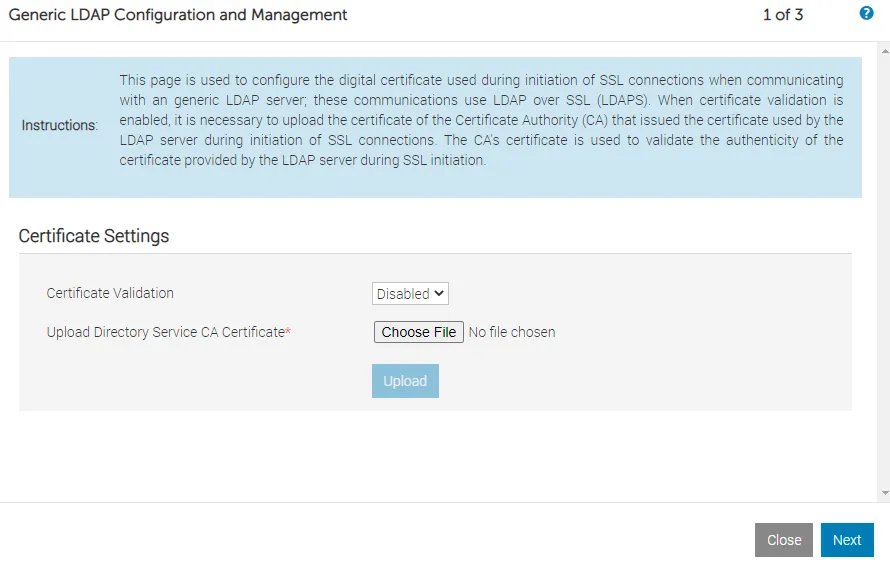
-
I used the following values:
Generic LDAP: EnabledUse Distinguished Name to Search Group Membership: EnabledLDAP Server Address: freeipa.grant.lanLDAP Server Port: 636Bind DN: uid=grant,cn=users,cn=accounts,dc=grant,dc=lanBind Password: Your passwordBase DN to Search: cn=accounts,dc=grant,dc=lanAttribute of User Login: uidAttribute of Group Membership: member -
Click next and for Group DN I used
cn=grantgroup,cn=groups,cn=accounts,dc=grant,dc=lanwheregrantgroupwas the name of the user group I added -
I ran the test with the following results:
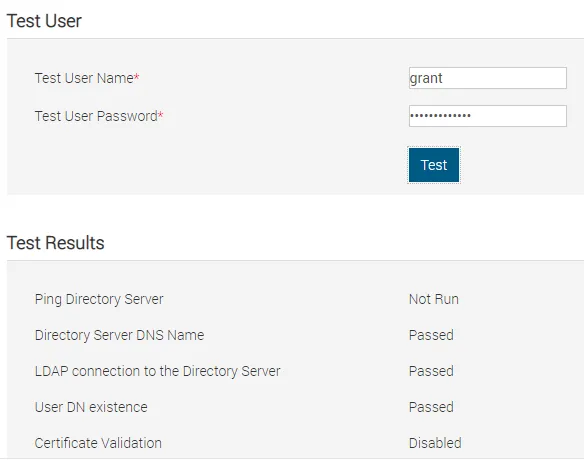 # Test ResultsPing Directory Server Not RunDirectory Server DNS Name PassedLDAP connection to the Directory Server PassedUser DN existence PassedCertificate Validation DisabledUser Authentication PassedUser Authorization Passed# Test Log16:49:14 Initiating Directory Services Settings Diagnostics:16:49:14 trying LDAP server freeipa.grant.lan:63616:49:14 Server Address freeipa.grant.lan resolved to 192.168.1.9516:49:14 connect to 192.168.1.95:636 passed16:49:14 Connecting to ldaps://[freeipa.grant.lan]:636...16:49:14 Test user authenticated user=uid=grant,cn=users,cn=accounts,dc=grant,dc=lan host=freeipa.grant.lan16:49:14 Search command:Bind DN: uid=grant,cn=users,cn=accounts,dc=grant,dc=lanScope: subtreeBase DN: cn=accounts,dc=grant,dc=lanSearch filter: (uid=grant)Attribute list:objectClassmemberOfdnuidobjectCategorydefaultNamingContextnamingContextsldapServiceNamesupportedControlsupportedExtension16:49:14 Connecting to ldaps://[freeipa.grant.lan]:636...16:49:14 Test user authenticated user=uid=grant,cn=users,cn=accounts,dc=grant,dc=lan host=freeipa.grant.lan16:49:15 Connecting to ldaps://[freeipa.grant.lan]:636...16:49:15 Test user authenticated user=uid=grant,cn=users,cn=accounts,dc=grant,dc=lan host=freeipa.grant.lan16:49:15 Search command:Bind DN: uid=grant,cn=users,cn=accounts,dc=grant,dc=lanScope: baseBase DN: cn=grantgroup,cn=groups,cn=accounts,dc=grant,dc=lanSearch filter: (member=uid=grant,cn=users,cn=accounts,dc=grant,dc=lan)Attribute list:objectClassmemberOfdnuidobjectCategorydefaultNamingContextnamingContextsldapServiceNamesupportedControlsupportedExtension16:49:15 Privileges gained from role group 'cn=grantgroup,cn=groups,cn=accounts,dc=grant,dc=lan':LoginConfig iDRACConfig UserClear LogsServer ControlVirtual ConsoleVirtual MediaTest AlertsDiagnostic Command16:49:15 Test user grant authorized16:49:15 Cumulative privileges gained:LoginConfig iDRACConfig UserClear LogsServer ControlVirtual ConsoleVirtual MediaTest AlertsDiagnostic Command